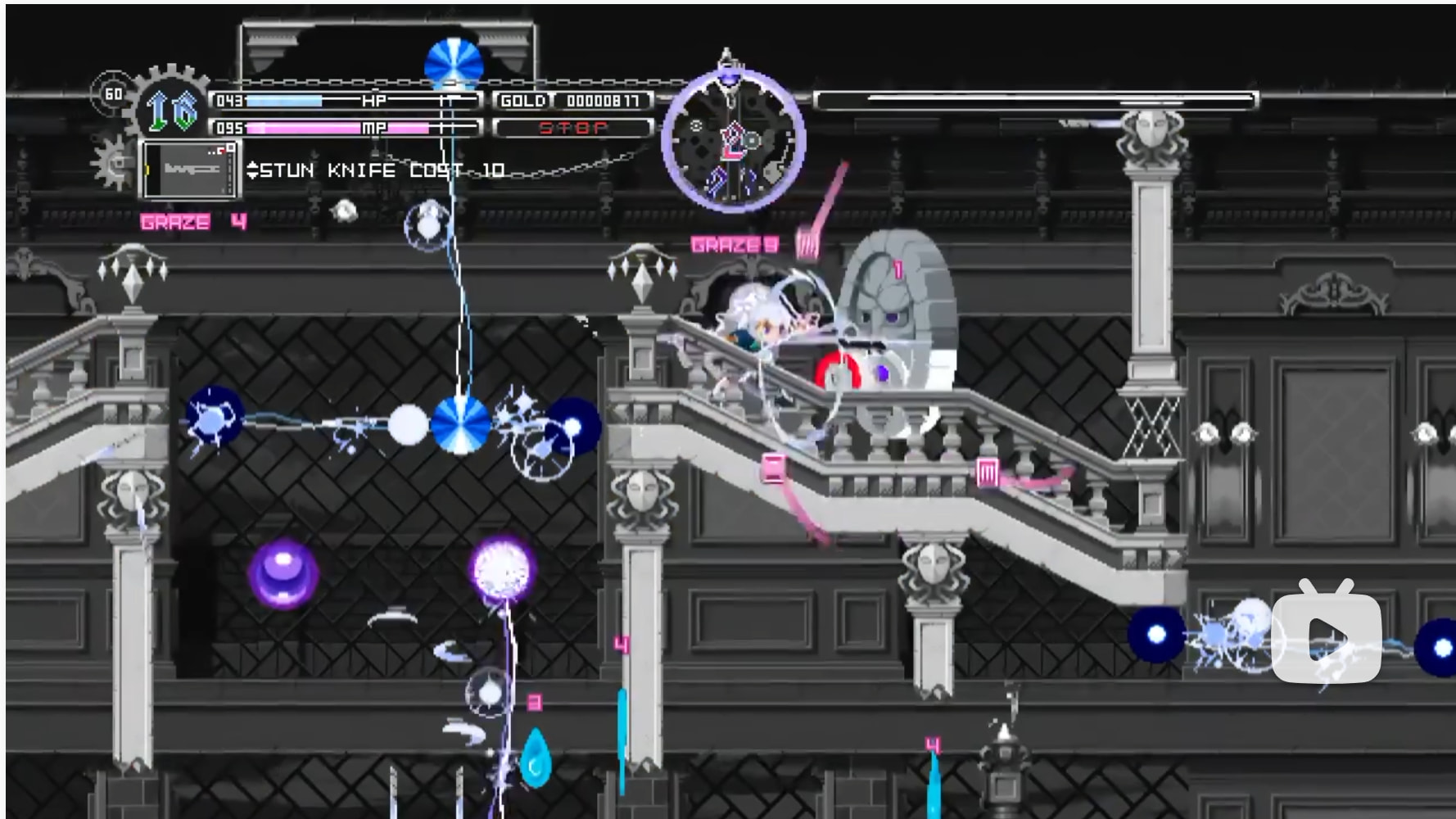
Desired Effect: Apply a black-and-white filter to the background and tiles. The background features a continuously scrolling multi-frame animation, which pauses during time stop (enemy objects and enemy bullets can have their black-and-white filter effects applied using visual scripts).
This is the desired effect: In Touhou Hisoutensoku, the background and tiles are in black and white during time stop, while the player and bullets remain in color.
Failed Attempt 1: Setting the screen effect to black and white also turns the player black and white (the sky scrolls continuously, and the flames burn continuously).
Failed Attempt 2: Setting the object’s filter to black and white allows applying the black-and-white filter effect during time stop for enemies and enemy bullets, but the background and tile colors do not change because there are no visual scripts executing filters for them, so the background and tiles continue playing animations normally.
From what I’ve found, the freezing part can be done without code. If you add Disable Layer to your time stop, pick the layer your player is on and check Is Exception, every other layer stops. In my test that froze the scrolling sky, the background, AnimatedSprite2D animations and particles. Enable Layer with the same settings brings it all back. Change Game Speed at 0% on your enemy and enemy bullet groups stops those too.
Animated tiles and shader effects kept moving on a disabled layer though. If your flames are animated tiles, I think making them an AnimatedSprite2D on a background layer would let them freeze. Anything on the same layer as the player can’t be disabled without freezing the player too, so I’d keep whatever you want frozen off that layer.
Here’s a video of what froze and what didn’t:
The black and white part is the harder one. There isn’t a way right now to put a filter on only the background and tiles. The scene effect covers the whole screen, player included, and the object filter only works on objects. I know it makes it difficult to get that Luna Nights look, but I’ve made a formal request for a way to choose which layer a filter goes on.
Thank you for your reply. I successfully created a scene freeze effect by “disabling layers” (which can be restored by enabling the layers), and I achieved a time-stop effect for enemies and enemy bullets by adjusting the game speed (restorable by readjusting the speed). As for the black-and-white effect, I will patiently wait for the official implementation of the visual effects in Luna Nights (bow).