[MZ][Visustella Item&Equip Core] Editing the Shop Status Window

Hello friends! First time poster, long time lurker (if you count the old forum).

I’ve been using the Visustella core plugins and I love them but the Shop and Equip store is giving me more trouble than any other. So here are some bullet points of my troubles:

-I have 4 extra custom parameters. The only way they will show is if I use the “compare” Data style.

-It’s cool! Right? Now the problem is that it only shows the current battle members. But this is not useful because I will have a lot of playable characters eventually.

-Ideally I would want for it to just show playable characters/party members (regardless if they are in the battle party or not) that can use the weapon type selected and to extend the max number of characters shown to 5 or 6
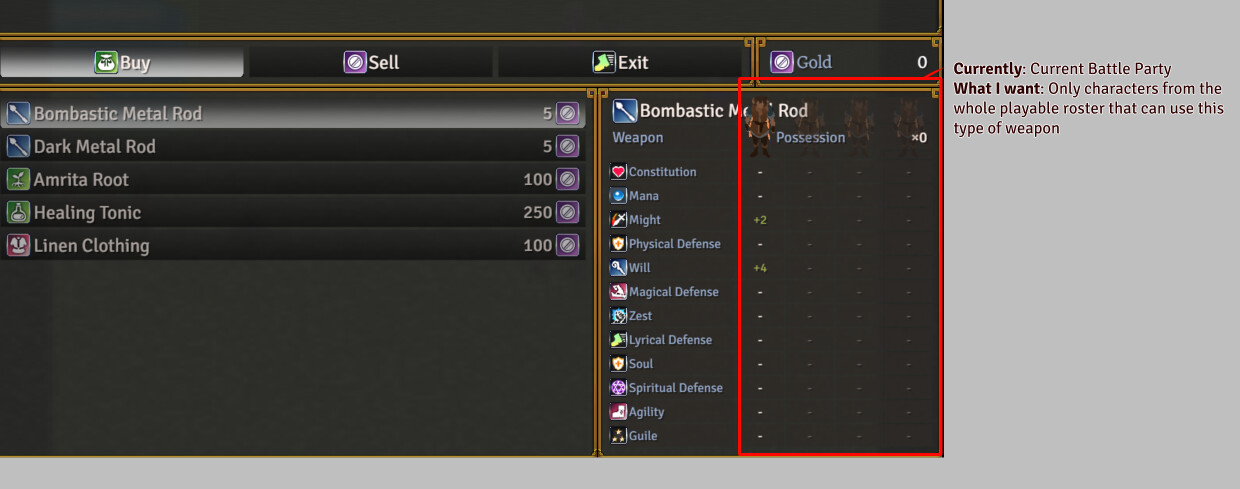
I assume it has to do with “actor.canEquip(this._item)” but I am way in over my head with this!

Here is the unedited code in the JS: Draw Equip Data

// Set Variables

const lineHeight = this.lineHeight();

const paramheight = this.gaugeLineHeight() + 8;

let x = 0;

let y = 0;

let width = this.innerWidth;

let height = this.innerHeight;

let hw = Math.floor(width / 2);

let hx = x + width - hw;

// Draw Item Name, Type, and Quantity

this.drawItemName(this._item, x + this.itemPadding(), y, width - this.itemPadding() * 2);

this.drawItemDarkRect(x, y, width);

y += lineHeight;

if (this.drawItemEquipType(x, y, hw)) y += 0;

if (this.drawItemQuantity(hx, y, hw)) y += lineHeight;

// Draw Parameter Names

const params = this.actorParams();

const backY = y;

y = height - (params.length * paramheight) - 4;

let paramX = x;

let paramWidth = 0;

let tableY = y;

for (const paramId of params) {

paramWidth = Math.max(this.drawParamName(paramId, x + 4, y + 4, width), paramWidth);

y += paramheight;

}

// Draw Actor Data

const actorMax = $gameParty.maxBattleMembers();

const actorWidth = Math.floor((width - paramWidth) / actorMax);

paramWidth = width - (actorWidth * actorMax);

for (const actor of $gameParty.battleMembers()) {

const index = $gameParty.battleMembers().indexOf(actor);

const actorX = paramX + paramWidth + (index * actorWidth);

this.changePaintOpacity(actor.canEquip(this._item));

this.drawActorCharacter(actor, actorX + (actorWidth / 2), tableY);

let actorY = tableY;

// Draw Parameter Changes

for (const paramId of params) {

const diffY = actorY - ((lineHeight - paramheight) / 2);

this.drawActorParamDifference(actor, paramId, actorX, diffY, actorWidth);

actorY += paramheight;

}

}

// Draw Back Rectangles

this.drawItemDarkRect(paramX, backY, paramWidth, tableY - backY);

for (let i = 0; i < actorMax; i++) {

const actorX = paramX + paramWidth + (i * actorWidth);

this.drawItemDarkRect(actorX, backY, actorWidth, tableY - backY);

}

for (const paramId of params) {

this.drawItemDarkRect(paramX, tableY, paramWidth, paramheight);

for (let i = 0; i < actorMax; i++) {

const actorX = paramX + paramWidth + (i * actorWidth);

this.drawItemDarkRect(actorX, tableY, actorWidth, paramheight);

}

tableY += paramheight;

}

Would appreciate if anyone has some input or knowledge! Thank you so much for you time

canEquip seems like the right check, the limit is just that the loop above it only ever gets handed the battle members. The block under // Draw Actor Data pulls from $gameParty.battleMembers() and sizes the columns off maxBattleMembers(), so those are the parts to swap. Everything below reads actorMax, so if you build your own list up front the rest of the code should follow along.

Try replacing those first four lines of that section with this:

// Draw Actor Data
const actorList = $gameParty.allMembers().filter(actor => actor.canEquip(this._item)).slice(0, 6);
const actorMax = Math.max(actorList.length, 1);
const actorWidth = Math.floor((width - paramWidth) / actorMax);
paramWidth = width - (actorWidth * actorMax);
for (const actor of actorList) {
    const index = actorList.indexOf(actor);

From this.changePaintOpacity down stays exactly as you have it. The 6 in the slice is your column cap, and the Math.max keeps it from dividing by zero when nobody can use the weapon.

allMembers() is the whole party including reserve. If you meant actors who aren’t in the party at all yet, that list would come off $dataActors instead, so let me know which one you’re after and I can write that version out.

One thing I’d keep an eye on, six columns in that window means each one is about a third the width it had at four, so the parameter numbers and the walking sprites may start crowding. If that happens you can drop the cap to 5, or shrink the font in this same script since it only affects this window.

That absolutely worked! Thank you so much, Baz!

After the code you wrote I added const actorX = paramX + paramWidth + (index * actorWidth);
Because the game had problems with ActorX not being defined, but after that everything worked like a charm :partying_face:

I am now faced with another problem. I’m unsure if it’s good practice to add it here in the same post or maybe I should create a new one. If that’s the case I will edit this out and remove it.

-Because of reasons I don’t want to use the Actor’s walking sprites to represent the party member. And I wanted to have something smaller like an icon, anyway. So I added an icon to the Actor’s nickname

and substituted this.drawActorCharacter with this.drawActorNickname and it kind of works! But it appears off compared to how perfectly centered the walking sprite was…

I assume it can be done tweaking the code in the last part of the //Draw Actor Data chunk, but I’m unsure if that’s possible

For reference this is how the code looks as of now. Thank you so much again for you help before and hopefully you can point me in the right direction with this too if it’s not too much trouble.

// Set Variables

const lineHeight = this.lineHeight();

const paramheight = this.gaugeLineHeight() + 8;

let x = 0;

let y = 0;

let width = this.innerWidth;

let height = this.innerHeight;

let hw = Math.floor(width / 2);

let hx = x + width - hw;


// Draw Item Name, Type, and Quantity

this.drawItemName(this._item, x + this.itemPadding(), y, width - this.itemPadding() * 2);

this.drawItemDarkRect(x, y, width);

y += lineHeight;

if (this.drawItemEquipType(x, y, hw)) y += 0;

if (this.drawItemQuantity(hx, y, hw)) y += lineHeight;


// Draw Parameter Names

const params = this.actorParams();

const backY = y;

y = height - (params.length * paramheight) - 4;

let paramX = x;

let paramWidth = 0;

let tableY = y;

for (const paramId of params) {

paramWidth = Math.max(this.drawParamName(paramId, x + 4, y + 4, width), paramWidth);

y += paramheight;

}


// Draw Actor Data

const actorList = $gameParty.allMembers().filter(actor => actor.canEquip(this._item)).slice(0, 6);

const actorMax = Math.max(actorList.length, 1);

const actorWidth = Math.floor((width - paramWidth) / actorMax);

paramWidth = width - (actorWidth * actorMax);

for (const actor of actorList) {

const index = actorList.indexOf(actor);

const actorX = paramX + paramWidth + (index * actorWidth);

this.changePaintOpacity(actor.canEquip(this._item));


this.drawActorNickname(actor, actorX + (actorWidth / 2), tableY);

let actorY = tableY;


// Draw Parameter Changes

for (const paramId of params) {

const diffY = actorY - ((lineHeight - paramheight) / 2);

this.drawActorParamDifference(actor, paramId, actorX, diffY, actorWidth);

actorY += paramheight;

}

}


// Draw Back Rectangles

this.drawItemDarkRect(paramX, backY, paramWidth, tableY - backY);

for (let i = 0; i < actorMax; i++) {

const actorX = paramX + paramWidth + (i * actorWidth);

this.drawItemDarkRect(actorX, backY, actorWidth, tableY - backY);

}

for (const paramId of params) {

this.drawItemDarkRect(paramX, tableY, paramWidth, paramheight);

for (let i = 0; i < actorMax; i++) {

const actorX = paramX + paramWidth + (i * actorWidth);

this.drawItemDarkRect(actorX, tableY, actorWidth, paramheight);

}

tableY += paramheight;

}

Same thread is fine, it’s the same window and the same block of code, so it all stays together for anyone who finds this later.

And yeah, good catch on the actorX line, that one belonged in there.

The offset is because those two draws treat x differently. drawActorCharacter passes through to drawCharacter, which centers the sprite on the x you hand it, so actorX + (actorWidth / 2) landed dead center on its own. drawActorNickname is a text draw, so x is the left edge of the text box, and the width argument you’re not passing falls back to a default that’s wider than your column.

Quickest version, sitting at the left edge of the column:

this.drawActorNickname(actor, actorX, tableY, actorWidth);

To actually center it there’s no align argument on drawActorNickname, so what I’d probably do is measure the text and offset it myself:

const nick = actor.nickname();
const nickWidth = this.textSizeEx(nick).width;
this.drawTextEx(nick, actorX + ((actorWidth - nickWidth) / 2), tableY, actorWidth);

drawTextEx runs text codes too, so if that icon is coming from a \I[x] in the nickname field it should still draw.

Vertical is a little different between the two as well. drawCharacter puts the bottom of the sprite on the y you give it, while text draws downward from y, so the icons will sit lower than the sprite did. A small negative nudge on that tableY value should bring them back in line, I’d just eyeball it against the parameter rows.

Thank you so much! That second code did it perfectly.

After your code I left the let actorY = tableY; so for the negative nudge on the tableY value, should that be on that last one on your code or this other one? and how should I format that?

Thank you so much. And one last thing before I let you go. I just wanted to move the “x0” next to “Owned” a bit to the left so it’s out of the way, is there a way to do that in this “Draw Equip Data” code? I’ve been tinkering with it but alas.

Put the nudge on the drawTextEx line only, not on let actorY = tableY;. That one is the starting point for the parameter rows underneath, so moving it would slide all the values down with it.

So it goes in the y argument of the call:

this.drawTextEx(nick, actorX + ((actorWidth - nickWidth) / 2), tableY - 6, actorWidth);

The 6 is just a starting guess, bump it until the icons sit where you want them.

For the ×0, the only handles this script gives you are the x and the width on this line:

if (this.drawItemQuantity(hx, y, hw)) y += lineHeight;

If that number is drawn right aligned inside the width you pass, shrinking the width pulls it left and leaves the Owned label where it is. Try hw - 40 and see if it shifts. If it doesn’t move at all then the position is coming from inside the plugin rather than from what you hand it, and it wouldn’t be reachable from this box. That one’s a test rather than an answer, I’m not certain which way VisuStella draws it.

Everything worked perfectly!

a -43 on that tableY and a -60 on the hw did it.

Thank you so so much for your help, Baz. Not only for giving me the answers but for explaining everything! :star_struck:

You are welcome!