Link Inspector
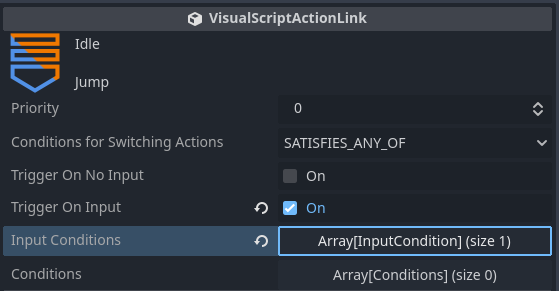
Priority
If multiple transition conditions are met simultaneously, the link with the higher value will activate.
Conditions for Switching Actions
SATISFY_ALL: Transitions only when both “Input Conditions” and “Other Conditions” are satisfied.
SATISFY_ANY_OF: Transitions when either “Input Conditions” or “Other Conditions” is satisfied.
FINISHED_ANIMATION: Automatically transitions once the animation of the previous state has finished playing.
UNCONDITIONAL: Transitions immediately after the execution action of the previous state is completed.
Trigger On No Input
Indicates a neutral input state.
Trigger On Input
Indicates a state where specific input has been received.
You can select an empty array and add inputs via “Add New Input Condition.”
Input actions configured in the project’s Input Map can be selected.
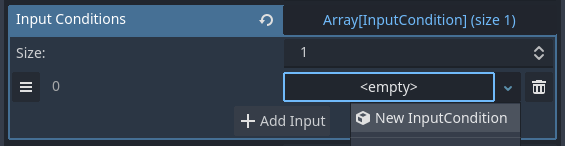
Registered Key: Specifies a single specific key. You can specify the timing as: on press, while holding, on release, or while not holding.
Four Any Input Key: Primarily used for movement-related conditions. Assign any key to each of the four directions. Note that keys set in MoveAndJumpSettings are used to specify the character’s movement direction, whereas this setting applies only to this transition condition and requires individual configuration.
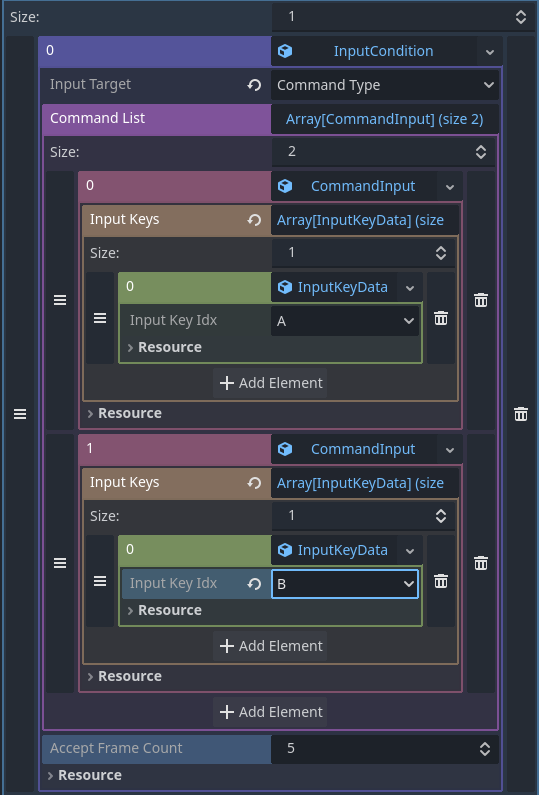
Command Type: Uses command inputs, similar to fighting games, as the transition condition. It is somewhat complex; the transition occurs when inputs are entered in the order of CommandInput0, then CommandInput1. Inputs must be entered within the AcceptFrameCount (Acceptance Frame Count). For example, in the image below, the condition is met by entering A → B within 5 frames.
Conditions
The methods for adding or copying/pasting conditions are the same as for execution actions.
Logical Condition with Previous Condition (AND/OR)
As the name implies, if set to AND, the condition is satisfied only when both the previous condition and this condition are met simultaneously. If set to OR, the condition is satisfied if either the previous condition or this condition is met.
This does not apply to the first condition.
Connecting Multiple Logical Conditions
Evaluation is based solely on the connection with the previous condition.
Therefore, if you create four conditions as:
A AND B OR C AND D
The resulting expression is evaluated as:
(((A AND B) OR C) AND D)
The condition is satisfied if A and B are met and D is also met simultaneously, or if C and D are met.