STEP2: Let’s try moving between scenes using a portal.
-
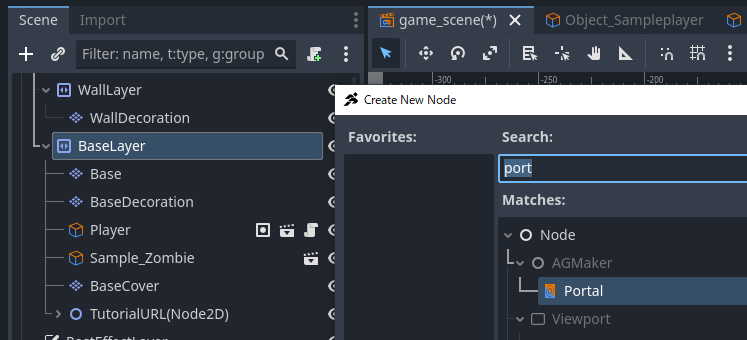
Switch to the game_scene tab. Create a Portal as a child of BaseLayer.
-
Configure the portal properties. Set it to trigger when entering from the right. Leave the destination scene path blank for now and proceed.
-
Set both the entrance effect type and exit effect type to BLACK.
-
Add 2 to the CollisionMask. This is necessary because the sample player’s layer is set to 2, so a mask of 1 alone won’t detect collisions.
-
Move the Portal’s coordinates to the right edge of the stage. At this time, please move the Portal node itself, not the PortalCollision. The position of the Portal node will be the destination.
-
The PortalCollision is too large, so let’s reduce its width. If it’s too big, collisions might trigger unexpectedly.
-
Next, create the destination scene. In the file system, duplicate game_scene.tscn to create game_scene2.tscn.
-
Open game_scene2 and delete the player. If not deleted, the player will split into two.
-
Move the Portal node to the left edge of the map.
-
Correct the position of PortalCollision. After moving through the portal, the size of the portal collision was changed, so it should be misaligned. In this image, the collision is on the right side of the Portal node, so move it to the left side.
-
Change the portal properties. Change the input condition from right to left, and set game_scene.tscn as the target scene. Then, you can select the portal in game_scene; select it.
-
Return to the game_scene tab. Similarly, set game_scene2.tscn in the scene path and select the portal.
-
Let’s test play. If configured correctly, you should be able to freely move between the two scenes.


Conclusion
That concludes the content of the Script Course tutorial.
The content explained in the tutorial is only basic.
In ACTION GAME MAKER’s visual scripting, various movements can be created by combining conditions and actions.
Depending on your creativity, someone might create something our development team never imagined.
If you come up with ideas, please share them on SNS or in the guild.
If you want to take other courses, check here
1. Graphics Course
This course is for those who want to animate characters they have drawn.
3. Expression Enhancement Course
This course is for those who want to add cool, Godot-style expressions.