Godot Screen Layout
Now, the following screen should be open. This is the basic screen of Godot and ACTION GAME MAKER.
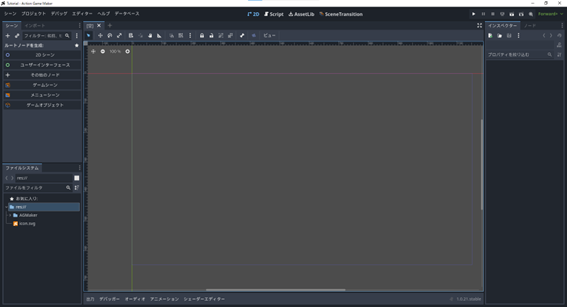
Each display area is divided as follows:

Although there are many screens arranged and it may seem complex, Godot’s screen is designed with the concept of:
“Select on the left, view in the center, and modify on the right”
Left Window
Scene: Nodes within the scene are listed. Imagine each component of the attraction being displayed one by one.
File System: All assets in the entire project are listed. In the amusement park example, think of this as a storage area where materials have been delivered to the construction site.
Center Window
Editor View: The overall view of the scene is displayed. Use this window to place components and build the attraction.
Right Window
Inspector: Information about the node selected on the left is displayed. Adjust the settings of the selected component. Imagine changing the color of a roller coaster or adjusting its maximum speed.
There are other screens not explained here, but understanding this concept first should make it easier to grasp. Now, let’s start operating.