B. Adding and Configuring the “BulletsSettings” Node
- Click the “+” (Add Child Node) button in the top-left corner of the Scene window.

- Select the BulletsSettings node and click “Create”.
-
In the Inspector window, on the right side of the bullet list, click Array[BulletData] to expand it.
-
Click the “+ Add Bullet” button.

- Click “” to select a new BulletData.

-
Click the created BulletData to expand it.
-
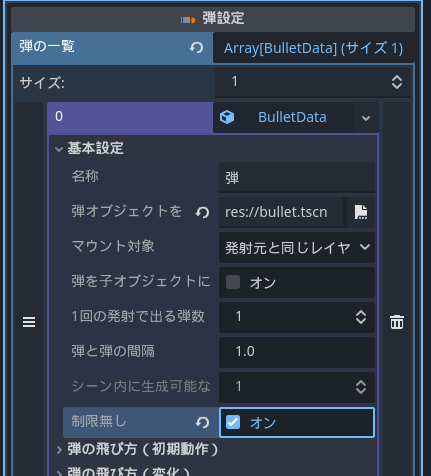
Expand the Basic Settings section, click the
 icon on the right side of “Assign Bullet Object”, and select the bullet.tscn file you created earlier.

- In the Basic Settings section, set “No Limit” to “On”. This option allows an unlimited number of bullets to be displayed within the scene.
-
Expand the “Bullet Movement (Initial Behavior)” section.
-
Set “Bullet Movement (Initial Behavior)” to “Fly in the display direction of the firing object”.
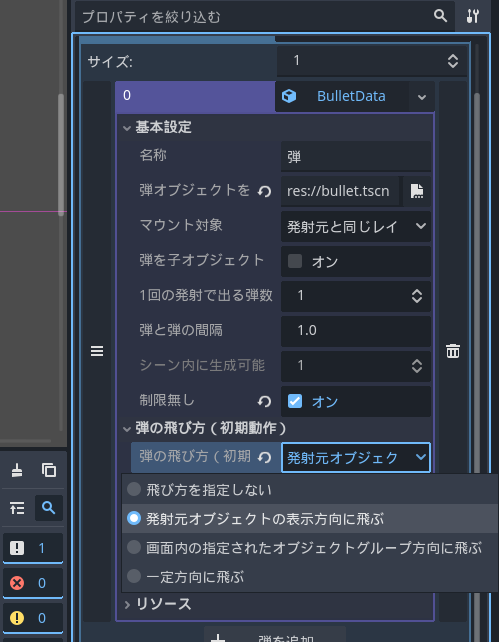
- Now, you can launch “bullet.tscn” “in any quantity within the screen” and “in the display direction of the firing object”.