Thank you for your continued support!
Currently, when retrieving database information from GDScript—for example, to display a list of all owned items—I am iterating through indices starting from 0 in a for loop and stopping when null is returned. However, when operating via the Visual Studio (VS) interface, the names appear as numbers, making it difficult to understand.
I noticed that the VS execution actions include an option to “Specify record by variable,” which suggests there might be another way to retrieve data. However, apart from get and update, I couldn’t find any other methods mentioned in the manual. If there are other available methods, please let me know.
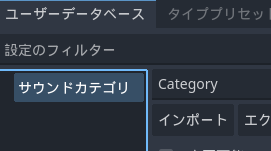
Additionally, when I enter English words starting with a capital letter as database names, they seem to be automatically translated. For instance, “Item” becomes “アイテム” (item), “Save” becomes “セーブ” (save), and “Category” strangely becomes “サウンドカテゴリ” (sound category)…
I will check with the development team.
It seems the automatic translation issue is caused by the editor’s translation feature based on PO files. I will check if this can be disabled.
1 Like
Regarding the translation, it has been corrected in today’s release of version 1.1.4.
Additionally, methods have been added and made public to retrieve and update database information using record indices.
Along with this, a new method to return the total number of records has also been added.
The added methods are as follows:
■ Methods to Retrieve Data by Record Index
-
get_project_database_plain_by_idx: For user databases
-
get_project_database_equipment_type_by_idx: For equipment types
-
get_project_database_attribute_type_by_idx: For attribute types
-
get_project_database_custom_type_by_idx: For user-defined type databases
-
get_project_database_sound_by_idx: For sound databases
-
get_project_database_variable_by_idx: For project variables
-
get_project_database_switch_by_idx: For project switches
■ Methods to Update Data by Record Index
-
update_project_database_plain_by_idx: For user databases
-
update_project_database_variable_by_idx: For project variables
-
update_project_database_switch_by_idx: For project switches
■ Methods to Retrieve the Total Number of Records
-
get_project_database_plain_record_max: For user databases
-
get_project_database_equipment_type_record_max: For equipment types
-
get_project_database_attribute_type_record_max: For attribute types
-
get_project_database_custom_type_record_max: For user-defined type databases
-
get_project_database_sound_record_max: For sound databases
-
get_project_database_variable_record_max: For project variables
-
get_project_database_switch_record_max: For project switches
1 Like
Thank you for your hard work!
Thank you for adding the method! It looks like we can do various things with simple code, and I’m looking forward to it.