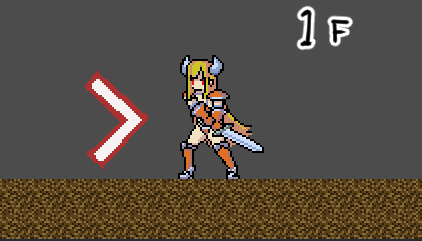
Orientation alignment during object generation is slightly delayed

In Patch Notes 1.1.0, it is stated:
“A bug has been fixed where the ‘Align orientation to this object on spawn’ process for object spawning causes a brief delay.”

However, the issue is still occurring.
Specifically, I am trying to add a trail effect during a dash and have implemented it as follows. If there are any workarounds, please let me know. The character is created using a sprite sheet (facing right), not a 2D bone.

Additionally, my current development environment is “AGM v1.1.4.stable, Godot 4.4.1”.

  • Created a game object for the trail effect (ghost.tscn).
  • Added an animation named “dash” to ghost.tscn.
  • In the initial state script of ghost.tscn, set the “dash” animation. The display direction is set to “None”.
  • In the player’s (player.tscn) script triggered by pressing the dash button, instantiate ghost.tscn and call its initial state.
    • During instantiation, the “Align orientation to this object on spawn” checkbox is enabled.
  • Upon testing, the behavior is normal when facing right, but when facing left, a right-facing sprite briefly appears before switching to the left-facing sprite.

Thank you for your assistance.

ghost_test.zip (179.6 KB)
I tried it locally, but I was unable to reproduce the issue.
Could you please check the attached file to see if the problem occurs, or let me know if there are any differences in the settings?

Also, regarding the afterimage, if it’s a simple afterimage without complex effects, there is a node called AfterimageSettings for generating afterimages. If you’d like, please give it a try.

I am also experiencing a similar issue and am struggling with it.

When using the “Fire Projectile” action, it fires correctly when facing right, but when facing left, the projectile is oriented in the opposite direction for only the first frame of the action execution.

As additional information, when facing right, I have set it to fire projectiles shaped like “>”.

The projectile movement when facing right starts from frame 2, but the projectile movement when facing left starts from frame 3.

I was also using the “Create Object” execution action, but encountered a similar issue to what isa-san described. I tried substituting it with the “Fire Projectile” execution action, but the same phenomenon occurred, leaving me at a loss.

I reported the relevant bug in June, but it seems it hasn’t been fixed yet.
I hadn’t touched AGM for several months, so I didn’t notice.

Recently, I tried working with GDScript a bit.
A similar phenomenon occurred with GDScript as well:
(I wanted the display to be flipped from the start, but it initially appeared normally)
Following a suggestion from AI Gemini, I added sprite flipping logic inside the _ready() function,
and it now displays flipped from the beginning.

func _ready() → void:

animated_sprite_2d.flip_h = true
(Note: This is not a proposed solution for everyone)

Of course, AGM is far more complex, and I don’t think it’s as simple as this…
I really hope it gets fixed soon.
Also, the corner girl is super cute ^^

1 Like

I see. The same phenomenon occurred in the past as well. If my memory serves me correctly, the bullet direction was normal (already fixed) until early September. However, since I haven’t used AGM from late September to mid-October, I’m not sure when it reverted to this state.

Seeing the staff constantly busy fixing various bugs, I hesitate to casually ask them to fix it, but I would be very grateful if it could be resolved as soon as possible.

Thank you for the corner girl matter (blushing).

1 Like

Hmm, so it was fixed once before.

The improvements to VS and the overhaul of the tutorials were indeed god-tier updates, but when adding such improvements and features, there is a possibility that the same bug could reappear.

I understand that development is challenging, but I hope it eventually becomes a god-tier tool, with the user base growing and more information becoming available.

Moonling-san

Thank you for your confirmation.

After reviewing the sample project you provided, I observed the same issue occurring.

If the problem does not occur on your end, it may depend on the machine specifications. Since my PC does not have high-end specifications, this could be the cause.

For your reference, here are my PC specifications:

■OS
Microsoft Windows 11 Home

■CPU
Name NumberOfCores NumberOfLogicalProcessors
Intel(R) Core™ i5-10210U CPU @ 1.60GHz 4 8

■RAM
Capacity
4294967296
4294967296

■GPU
Name
Intel(R) UHD Graphics
Virtual Display Device

Additionally, thank you for providing the alternative solution.

It seems that the desired functionality can be implemented using AfterimageSettings, so I will proceed with that approach.

Finally, I would like to confirm one point.

Despite searching online and within the AGM help documentation, I was unable to locate the node “AfterimageSettings” for generating afterimages.

Do you have any tips for searching (e.g., whether node names or descriptions can be searched in Japanese, or if searches can be performed based on the intended functionality)?

Also, I was unable to find a node that displays message box text one character at a time, so I implemented it using code based on Godot articles. Could there be such a convenient node that I simply haven’t found yet?

Thank you for your assistance.

Thank you for the spec report!
I would like to confirm one point. Is the display’s operating environment a non-60fps environment, such as 144fps?

Some nodes, such as AfterimageSettings, have brief descriptions within the editor, but the web documentation is still incomplete… We apologize for the delay in preparation and will work to expand it.

Nodes that display message box text one character at a time

Currently, there is no such node, so you will need to handle it via scripting.

1 Like

Moonling-san

I would like to confirm one point. Is the display’s operating environment a non-60fps environment, such as 144fps?

→ I just checked with the tool, and the operating environment is 60fps. Additionally, the refresh rate is 60Hz.

I am looking into the meaning of each node myself, but there is not much information available on the web, and there are many items whose usage I do not understand. Therefore, if necessary, I will ask further questions separately.

1 Like

This has been fixed in version 1.1.5 released today. We would appreciate it if you could verify the operation.

1 Like

Moonling-san,

Thank you very much for the quick fix! I’ve confirmed that the objects are being generated and bullets are being fired correctly, with the proper orientation. Now I can get back to making games with full energy!