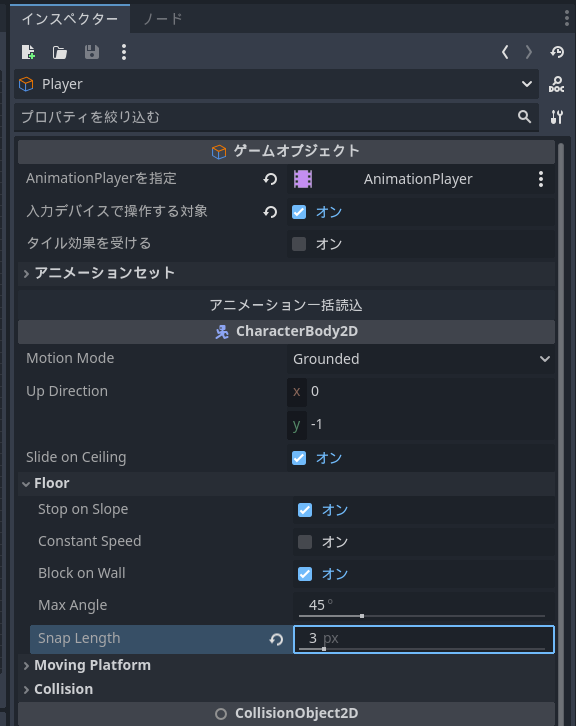
The player character is set to transition to a “airborne” state if they are not in contact with the ground or a slope in the downward direction.
However, with the current settings, it seems that when standing exactly between two slope tiles, the character enters the airborne state. Even when walking over adjacent slope tiles, the character briefly becomes airborne. Is there a good solution for this?
I originally copied this section and set it to the same configuration, but after reading this post and reviewing the settings, I realized that increasing the seconds to 0.1 would likely work well. Thank you!
Actually, with this update, parts that were working correctly before have also stopped functioning. Is there any way to revert to the previous behavior…?
Changing the protagonist’s collision detection from a capsule to a box seems to work correctly for slope tiles. (Still under verification, so something might be discovered later.)
Regarding this issue, it seems that using a box makes it harder for objects to land on slopes.
For tiles with the slope attribute, there is a setting called “contact from above.” However, when an object lands using a box, contact can only be specified in the “up, down, left, right” directions. This might cause issues because when touching a diagonal slope, the contact judgment could be either horizontal or vertical.
With my current game specifications, this is not a problem, but it may prevent features like rotating floors from working.
First, I sincerely apologize. My initial verification was mistakenly conducted in an older environment (1.0.17). However, when I tested it in the current version (1.0.18), the project you previously provided was able to ascend and descend the slope normally.
The same result was observed when the shape in the previously provided project was changed to a capsule; it also ascended and descended the slope normally.
To confirm, is the target project named “TEST/Action Game Test”?
Would it be possible for you to provide the project where the issue is occurring again?
You can move up and down, but it transitions to an aerial action midway. Since the data I previously provided has been overwritten, please use arbitrary images to verify.
After re-adjusting everything and checking again, it appears there is a brief moment where the character is airborne between the bottom of the slope and the tile.