Explanation of the AGMaker dedicated node “ChangeAngleSettings”.

Overview
ChangeAngleSettings (Mouse/Stick Angle Linkage Settings) is a configuration node that automatically rotates an object based on the angle of a game controller stick or the relative angle between the game object and the mouse.
It is primarily used in genres such as stick shooters and mouse shooters.
Settings
Use Left/Right Stick Input: Select the controller stick you want to link.
Use Mouse Position: Select this if using the mouse.
Target Node: The specified node will automatically rotate.
Is Add Node Rotation: When ON, it adds to the original angle of the target node.
Base Angle: An item for angle adjustment. You can specify a rotation offset with the right direction as 0 degrees and the upward direction as 270 degrees.
Upward/Downward Rotation Limit: Set the maximum tracking angle. Setting both to 180 degrees allows for 360-degree rotation.
 Precautions
It will not function correctly if inversion actions are performed.
If Auto Y Flip Animation is enabled, it will not function correctly during inversion actions.
This is because inverting the entire game object causes the mouse coordinates and stick coordinates to become misaligned.

Do not select a node that is rotated using AnimationPlayer.
In animations where the Rotation property is used as a keyframe in AnimationPlayer, the Rotation will be overwritten, causing it to malfunction.
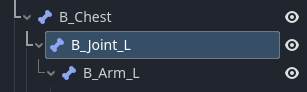
Special care is needed when using bone animations.
For the sample player, selecting the B_Joint_L bone allows the arm to rotate correctly.