
I designed a dart weapon (bullet) that automatically rotates, producing a windmill-like effect.
The previous AGM approach was to use a script to control the angle change of this object and achieve automatic rotation. However, AGM itself does not provide an event for angle change, and automatic rotation cannot be achieved in ChangeAngleSetting.
So I had been putting off this feature until my buddy Justus provided me with an idea on how to make it using AnimationPlayer.
I didn’t know much about AnimationPlayer before, but with further learning, I can now achieve automatic rotation of objects.
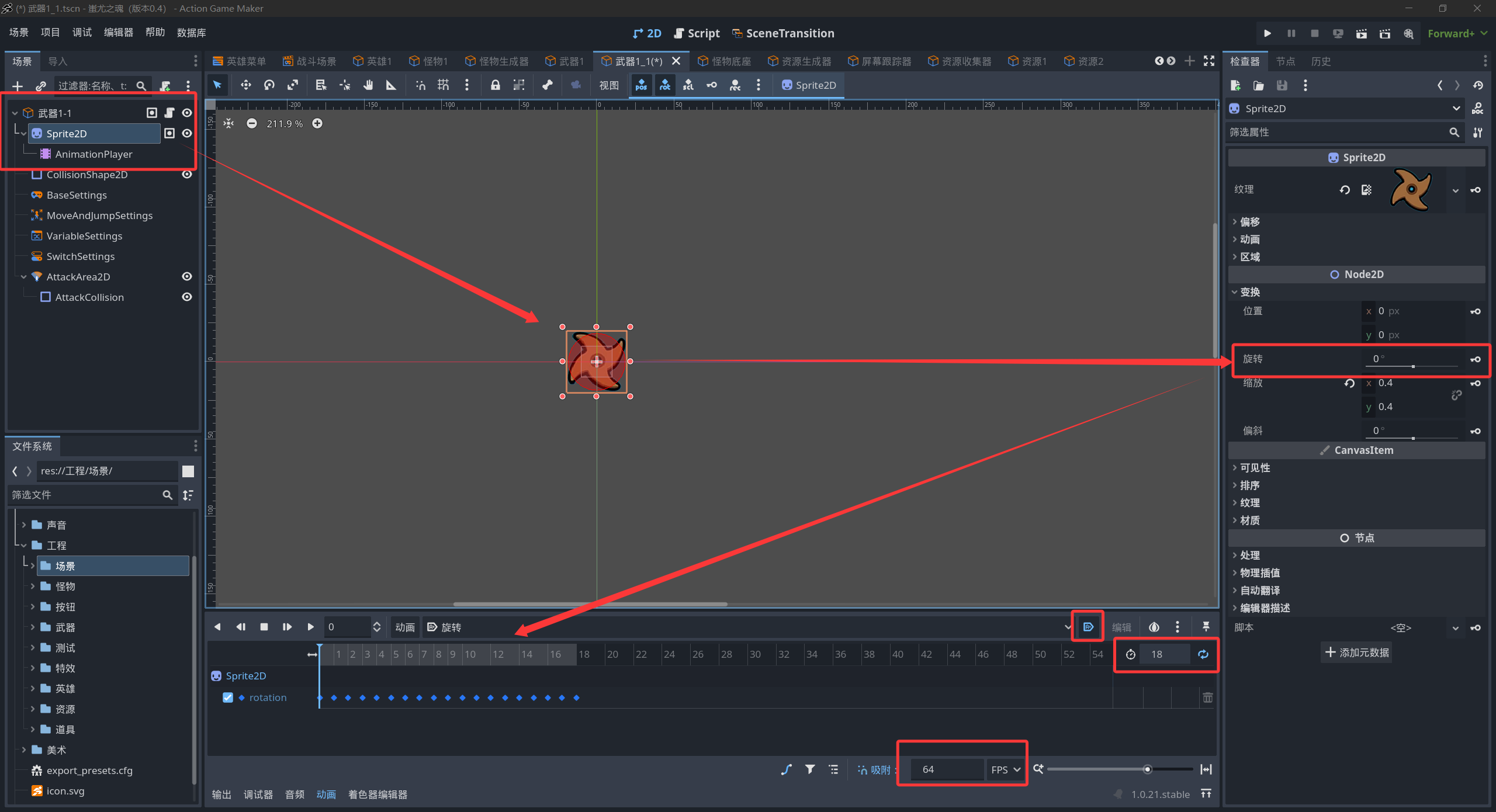
Specific steps:
- On the root node of the object scene, create a Sprite2D node and place the relevant image assets inside.
- Under this node, create an AnimationPlayer node.
- Open the AnimationPlayer, create a new animation named “Rotate”, and set it to “Auto Play” and “Loop”.
- To ensure playback speed, the relevant frame counts and interval values are as shown in the figure. (These can be adjusted according to needs; manually adjust keyframe intervals.)
- Keyframe the animation with a minimum unit of 5 degrees (angle), keyframing up to a change of 90 degrees (angle).
- Complete, test with F5, and enjoy the results!!!
Finally, thank you again to JUSTUS for the help!!!