When I change the settings of a duplicated object, the original object’s settings are also changed simultaneously, which is very confusing.
How can I make the duplicated object independent from the original object? Or is this a bug?
This is a Godot specification:
When duplicating with Ctrl+D, it is typically duplicated in a “non-unique (linked to original data)” state.
If you want to make minor adjustments to an object placed on the stage directly, you can right-click the object and set it as an editable child.

For anything else, right-click the resource (such as images or animations) that is linked and make it unique to break the shared state.
If it is something other than that, right-click on the linked resources (such as images or animations) and select “Make Unique” to break the shared state.
Thank you for your answer. Sorry to bother you, but could you please provide additional information?
On which screen can I right-click to access the “Make Unique” option? Right-clicking in “File System” or “Scene” does not show the “Make Unique” item.

Uniquification cannot be applied in bulk directly to the game objects themselves; it must be done separately for each resource.
Could you please explain specifically what operations are used to create duplicates and which items become linked?
For example, when trying to duplicate the UI_Coin_counter object from the tutorial and reuse it for a counter with a different variable, it seems that changing the animation of the duplicated object also affects the animation of the original object.
The duplicated object’s AnimationPlayer displays the following, appearing to reference information from another object (possibly a coin?), but I am unsure how to resolve this.

Regarding this, the coin uses an external resource named coin_counter.tres as a resource for the animation.

Therefore, if you modify the animation, you will end up changing the original
coincounter.tres, causing the changes to propagate to other objects.To prevent this, open Animation > Animation Manager and

press the Save button for
coincounter.tres to make it unique.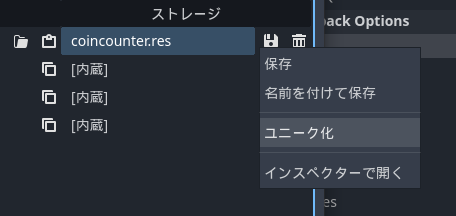
1 Like
Thank you. I was able to make it unique. I was in a very difficult situation, so this was a great help.
1 Like