Add “Defeated” State to the Player: Creating Particles
Just like enemies, the player should be defeated when their HP reaches 0. Since there doesn’t seem to be a suitable frame for the “defeated” state, let’s add a visual effect using “particles.”
What are “Particles”?
In Japanese, “particles” translates to “particles.” They are used to create visual effects by scattering many small images. You can think of it like confetti. You can freely adjust the appearance and movement of the “confetti,” such as how the paper looks and how it flies.
In Godot Engine, this can be achieved using nodes called “GPUParticle2D” and “CPUParticle2D.” In ACTION GAME MAKER, it is handled using a node called “ParticleObject.”
Furthermore, “ParticleObject” supports over 20 particle templates.
Let’s Create a Particle Object
The creation process is exactly the same as for game objects.
- Create a new Scene tab.
- Create a root node: Select “Game Object.”
- Set the object name to “Defeated Particle,” select the “Particle” template, and click “Create.”
- Select the created “Defeated Particle” node in the Scene window.
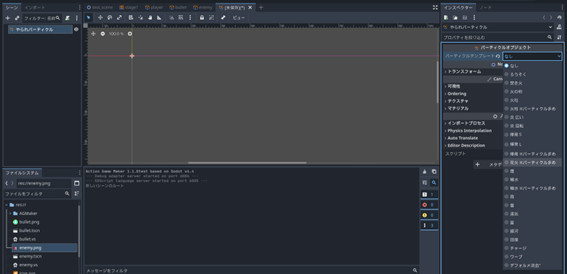
- In the Inspector, change the Particle Template from “None” to “Fireworks (High Particle Count).”
- A “GPUParticles2D” node will be automatically added.
- Check the “Emitting” property in the GPUParticles2D Inspector. This property controls the emission of particles.
- Particles should now be emitted in the Scene view, creating a fireworks effect. Right-click the Unsaved tab and save the file as “defeated_particle.tscn.”