■Prerequisites
The player is on the left side of the screen, and enemy characters are on the right side, facing left.
Set the enemy’s state machine as follows:
Idle → Attack → Idle (shortcut)
Idle → Attack: if the distance is within 128
Attack → Idle: when the attack animation finishes
- Distance to other objects
- Specify direction: same direction as this object, or specify only

- Distance: 128
- Distance condition: closer than
- Target type: Object
- Target object type: Object
- Target object path: specify the player’s .tscn file
- Target object position: nearest object
With the above conditions, the link activates when within 128, but the link stops working when the enemy gets too close (around 32 or less?).
When diagonal directions are also specified, the enemy functions correctly even when very close.
Is this intended behavior?
Upon verification, this is the intended behavior.
Regarding the distance conditions with other objects:
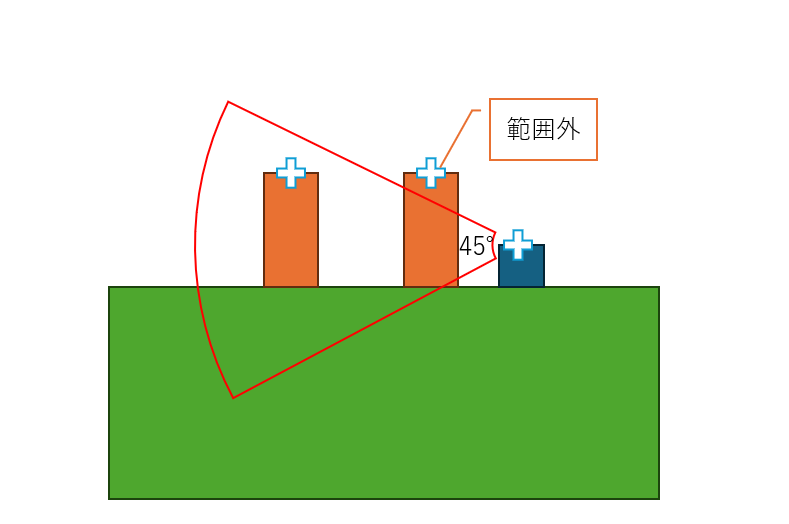
- The direction generates a fan-shaped detection range divided into 8 directions at 45° intervals.
- Distance and direction are determined based on the positions of the “origins” of the GameObjects.
Due to this specification, when objects are created with their origins at the top of their heads, significant differences in height can result in the situation shown in the diagram below, where “the distance condition is met, but the object falls outside the left range.”
Therefore, to avoid this issue, you can either align the origins of the objects horizontally or configure the detection range to include positions such as top-left or bottom-left.
So the detection is based on a circle with a specified radius (and angle).
I understand that this is the intended specification.
Is the “distance to attack hitbox” also subject to the same specification?
By the way, is there no option for a simple condition based on comparing X positions (or Y positions)?
For example, I’d like to implement something like: if an enemy approaches while there’s a height difference (similar to Dossun), it falls down.
If I were to do this in Visual Studio, I’d think I’d need to create a variable by adding or subtracting the desired distance from the player’s X position, then loop through it every frame, checking whether the enemy’s X is greater or smaller. But that seems quite cumbersome…
Or is the idea to use the recently added “Condition Check via Script”?
I haven’t used “Condition Check via Script” yet, so I’d appreciate a simple implementation example.
We will check the distance to the hitbox.
There is no simple X-position comparison, but as you pointed out, this can be resolved by using “Condition Check via Script.”
Here is a simple sample:
-
Prepare a Node2D as a child of the object you want to configure. 
-
Attach a GDScript to the Node2D and overwrite its contents with the following. The expression below defines a method named is_player_in_x_range that returns TRUE when an object in the “Player” group comes within 100 units.
extends Node2D

@export var attack_range := 100.0
var player: Node2D

func _ready():
    # Automatically retrieve objects registered in the "Player" group
    player = get_tree().get_first_node_in_group("Player")

func is_player_in_x_range() -> bool:
    if not player:
        return false

    # Check only the difference in X coordinates
    var diff_x = abs(global_position.x - player.global_position.x)
    return diff_x <= attack_range
-
Specify the Node2D created with “Condition Check via Script,” and set is_player_in_x_range as the method.
“Execute Script” and “Condition Check via Script” work by using methods from GDScripts attached to child nodes as conditions or actions.
The part written as func ~~~~ represents a method. By continuing to add more methods to this GDScript, you can utilize various methods as needed.
1 Like
Thank you!
I was just writing GDScript in a very similar way, lol.
So for conditional checks via links, I just need to create a method that returns a boolean value, right?
I’m thinking of doing it a slightly different way: I want to always call a method in the “Execute Action” section and keep track of the x-distance and y-distance.
I’d like to store these values in a user-created variable via the GameObject’s VariableSettings.
How should I specify this from GDScript?
Example: I want to assign a value to a user-created variable named distance_x.
| Assign variable data |
$“Path to VaribleSettings”.set_value(“Variable Name”, Value to Assign) |
So, should I just define the variable name myself as “distance_x”?
Yes, I think we can do it over there.
1 Like
Regarding the distance to the hit detection, it was explained in a similar manner:
“The distance between the ‘GameObject’s origin’ and the ‘origin of the shape of the hit detection (AttackArea2D)’.”
1 Like