Reproducible Version
AGMaker 1.0.12
Problem Description
Desired effect:
Object A uses a VS script to create state transitions. The condition is: when Object B is within 30 pixels, it transitions to the InDistance state, displays “InDistance” text, and in the InDistance state, pressing the Enter key displays “CheckInDistance” text. When Object B is beyond 30 pixels, it transitions to the OutDistance state, displays “OutDistance” text, and in the OutDistance state, pressing the Enter key displays “CheckOutDistance” text.
Issue encountered:
Inability to correctly recognize distance.
As shown in the figure below:
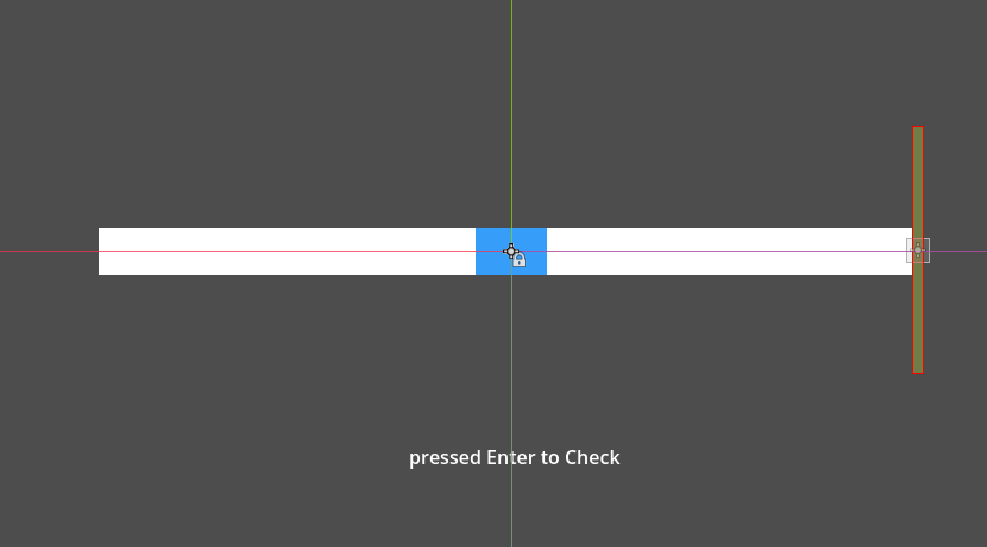
In the figure, the blue object is 60 pixels long, with the center point 30 pixels from each edge. The green vertical bar object moves left and right at 500 pixels per second using a template, but it fails to correctly achieve the InDistance state when the green bar is within the blue area. Pressing Enter in the first half of the blue area displays OutDistance, and pressing Enter shortly after exiting the blue area also displays OutDistance.
Reproduction Steps
- Download the attachment, extract it, and run it by pressing F5.
- The vertical bar will move left and right. Press Enter when it is within the blue area to perform detection, and press Enter again when it is outside the blue area. (Pressing Enter after one detection ends restarts the detection.)
- Pressing Enter in the first half of the blue area results in the OutDistance state, and pressing Enter shortly after exiting the blue area still shows the InDistance state. ----> BUG
Attachment
distancetest.zip (525.8 KB)