変な質問だとは思うんですが、私の場合、職場を長い間離れることになり、作業を続けられるデバイスがiPadしかないんです。それを使ってプロジェクトを引き続き進める方法はあるでしょうか? RPGツクールMZのポータブル版があればいいなと本当に願ってるんですが、無理ですよね… 。思いつく解決策はアセットを描き続けることくらいなんですが、RPGツクールでテストしながら進められないと難しいんですよね。
「いいね!」 1
うーん、思いつく方法としては、ウェブデプロイ版を作成して、それを iPad から実行する方法がありますね。私は Apple 製品を持っていないので確実ではありませんが、ローカルサーバーインスタンスのようなものでローカルにウェブを動作させる方法があるかもしれません。
それでも正しいエディタを開くことはできませんが、多くのデータファイルが JSON ファイルなので、手動でデータファイルを変更して実験することもできます。少なくともグラフィックアセットの作業とテストはできるはずです。
もう一つの案は、グラフィックに関することはできる限り先に進めて、エンジン内でのテストは後回しにするということです。
もしかしたら、もっと良い解決策を知っている人もいるかもしれませんね。あなたが満足できる解決策が見つかることを願っています。
「いいね!」 2
私は持ち運び可能なノートパソコンを使うことが多いです。とても便利です。でも、Android で RPG メーカーを動かせるようになったらいいなと思います。
「いいね!」 1
この回答があなたの問題を完全に解決するとは限りません。しかし、自分で解決する方法を考えるきっかけにはなるかもしれません。 
私も似たような問題に直面し、それを解決できました。ただし、私の場合はAndroidデバイスでMV(RPG Maker MV)を使う場合でした。あなたのケースは、AppleデバイスでMZ(RPG Maker MZ)を使う場合ですね。
私が基本的に行ったこと: Androidには「JoiPlay」というエミュレーターがあり、これを使えば誰でもスマホでデスクトップ/PC用のRPG Makerゲームを実行できます。
私はこれを使って、スマホでMVゲームを実行しました。
ゲームがスマホで動作するようになったら、AIを使って簡単なプラグインを作成しました。これは、MVゲームの中にビジュアルノベルゲーム作成ツールを組み込むものです。
- このプラグインは、プラグインコマンドを実行することで、ビジュアルノベルゲームを新しいシーン(メニューやバトルのようなもの)として開きます。
- このゲーム内のすべてのコンテンツ(画像とテキストのみ)は、別のテキスト/JSONファイルから読み込まれ、編集も可能です。
そのため、スマホ上では次のように見えます:
JoiPlayエミュレーターアプリを開くところから:

MVゲーム内でプラグインコマンドを実行し、ビジュアルノベルゲームをシーンとして開く:

そして、シンプルなテキストファイルを通じてこのゲームのコンテンツを編集:

これにより、私はスマホ上でシンプルなビジュアルノベルゲームを作成できます。表示する画像やセリフを選択することが可能です。このゲームの作業が終わったら、直接公開することもできます(スマホからゲームファイルをZIP圧縮して共有するだけ)。あるいは、テキスト/JSONファイルをメインのMVプロジェクトに追加し、MVゲーム内でプラグインコマンドを実行してこのビジュアルノベルゲームを起動することもできます。
注意: これはMVプロジェクトを編集するものではありません。既存のプロジェクトに追加できる、新しいコンテンツや新しいファイルを作成するものです。あるいは、単独で公開することも可能です。
スマホでビジュアルノベルを作成できるようになった後(「作成できるようになった」という意味での成功です…つまり、それらを作って成功や名声を得たわけではありません…(T_T))、私は次に、MVゲーム内でプラグインコマンドを通じて起動される、RPGM風のアドベンチャーゲームエンジンを作成しました。
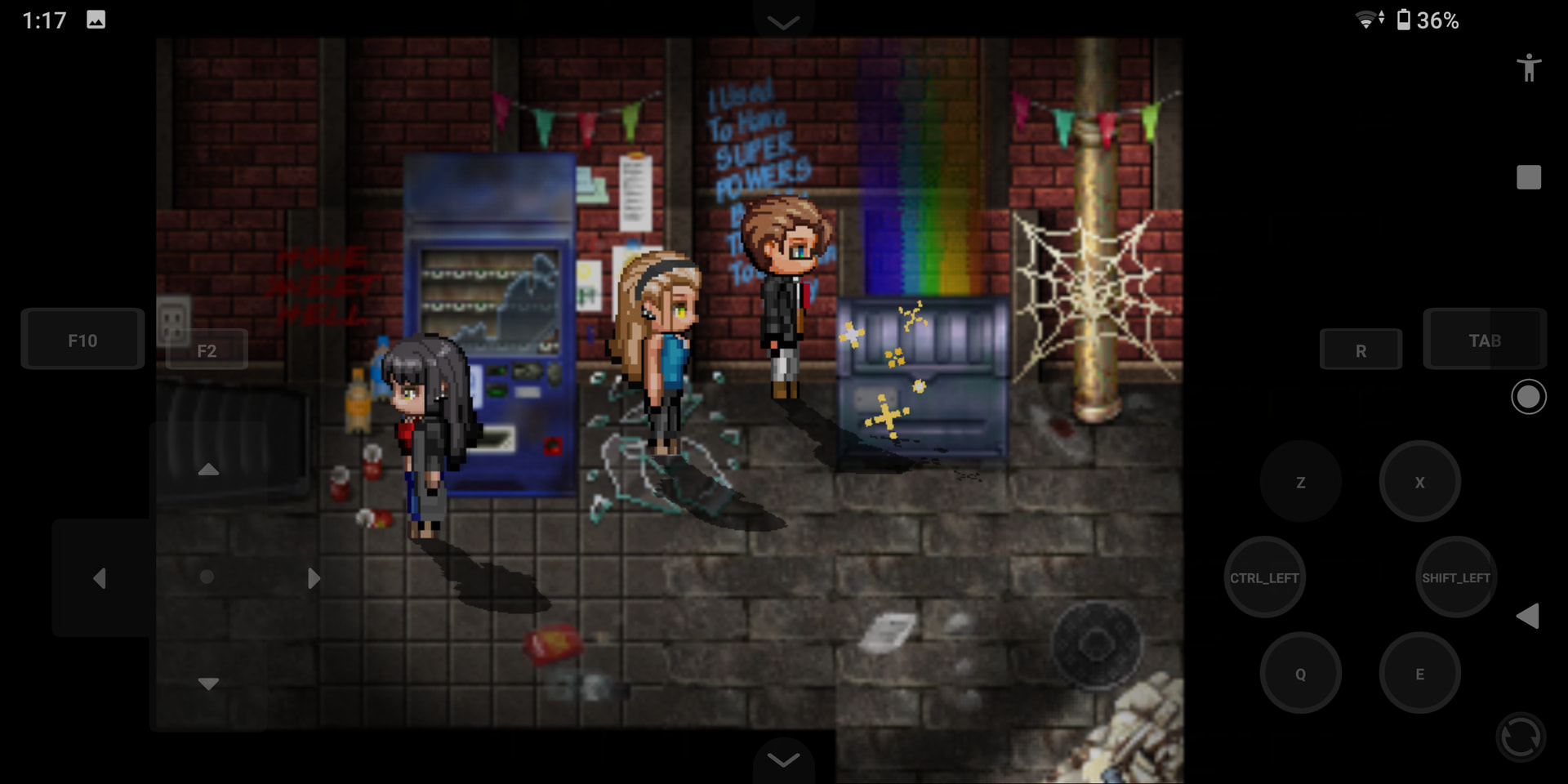
さらに、これらのゲームエンジンのためのビジュアルエディターも作成しました。これにより、テキストファイルを直接編集することなく、コントローラーを通じて編集できるようになりました(主に)。

また、AIを使ってマップエディターもプラグインとして作成しました:

その後、タイトル画面を作成するプラグイン、2Dプラットフォーマーゲームを作成するプラグイン、ポイント&クリックゲームを作成するプラグインも作りました。
今はデスクトップOSの開発に取り組んでいますが…
咳払い…
要するに、プラグインを通じて「シーン」を活用し、AIの力を借りる(自分でコードが書けない場合でも)ことで、MV/MZゲームの中に完全なソフトウェアやゲームエンジンを作成できます。これにより、ゲームの編集や、より多くのコンテンツの作成が可能になります。
そして、ゲームを実行できるデバイス(JoiPlayエミュレーターのように、ファイルが圧縮されずに露出している場合)があれば、そのデバイス上でMZプロジェクトの開発を続けることができます。
上記の方法を試す前に、AndroidデバイスでWindowsを実行できるアプリを使っていました。Windowsを実行すれば、その上でRPG MakerなどのWindowsアプリケーションを実行できます。
ある程度は成功し、そのようなアプリを通じてRPG Maker MVをインストールし、MVプロジェクトを開くことができました。しかし、しばらくすると動作が停止し、起動しなくなりました(私のスマホは古く、性能も低く、非常に古いバージョンのAndroidを実行しているため、そのせいだと考えました)。
私の理解では、iPadはかなり高性能なデバイスですよね?もしかすると、iPad上でWindowsを実行できるアプリがあるかもしれません…?あるいは、デスクトップ用のMacソフトウェアでしょうか?それを使ってMZをインストールし、MZプロジェクトを開くことができるかもしれません。XD
「いいね!」 1
マッピングに限定されていますが、このアプリは非常に良く機能します。
「いいね!」 2
とても参考になります!スマホで動かせるなんて驚きです(古いAndroidスマホを持っているので、試してみようかなと思います)。
ここでVN(ビジュアルノベル)のチュートリアルについて説明し始めたときは、正直驚きました。実は自分でも作ろうと思っていたところだったので(O_O)。
プラグインの詳細についてはまだ詳しく理解できていませんが、このプラグインを使えば、プロジェクトにプラグインがいくつかあるだけで既に読み込みに時間がかかっているゲームの読み込み時間を短縮できるのではないかと感じました。
iPadでWindowsのウィンドウをシャドウ表示できるアプリ(有料)があるようですが、私には偽物っぽく感じます(本当にレビューしていただきたいです)。
iPadは強力なデバイスだと思っていますが、コーディング能力が期待はずれになるかもしれません(GodotのiOS版「xogot」を使ってみましたが、シンプルなプラットフォームゲームを作るだけで頻繁にクラッシュしました)。
解決策を教えてくれてありがとうございます!この返信が私以外にも多くのユーザーの役に立つことを願っています 
「いいね!」 1
うんうん!ゲームを作る前に使ったことあるんだけど、めっちゃ便利だね
「いいね!」 1
これは素晴らしいアイデアかもしれない。Windows で作業して iOS で動作することを期待するのは、裏切り者のような気分だ 
私のゲームは、おそらくゲームのサイズが 400MB 程度あるため、ブラウザでは実行できない。ブラウザで試す方法を探そうか。
(デプロイされた Web バージョンでいじくることについては、私の経験からおすすめしない。不要なファイルを削除しようとしたら、全く動かなくなってしまった。また、「未使用ファイルを除外」機能を使ったら、プラグイン全体とアセットが削除されてしまった  (ファイルを変更するのは問題ないと思うが))
でも今考えてみると、実際に自分のゲームを試してみたり、iPad へのポートを考えたりしたことがなかった。これほど仕事をしたくないのか?