Googleで検索するとGemini AIの概要が押し付けられてくる以外に、これが可能かどうかを十分に理解しているわけではありません。RPGツクールでJavaScriptアプリケーションを実行する方法を見てみたいです。そのためにどのようなプラグインやトピックを学ぶ必要があるのか、まだはっきりとはわかりませんが、皆さんのおすすめは検討します。
私の目標は、RPGツクールだけでは作成が難しいであろうミニゲームを実行できるようにすることです。おそらくオープンソースのミニゲームを見つけてきて、自分のニーズに合わせて調整することを検討するでしょう。
私はRPGツクールでJavaScriptアプリ経由でミニゲームを実行することに固執しているわけではありません。もし実質的に同じことができる別の方法をご存知の方がいれば、喜んで試してみます。
RMのどのバージョンを使っているのかはわかりませんが、質問の意図も完全に理解できているわけではありません。ただ、ミニゲームが欲しいということは理解しました。Galv氏はRMMV用のミニゲームプラグインをいくつか提供しています:
Galv氏はVXAやMZ用プラグインも提供していますので、それらをお使いの場合もご覧ください。
フィッシングミニゲーム
インベーダーミニゲーム
賞品引き当てくじ
mjshi氏によるQTE/チェーンコマンドタイプのミニゲームもあります。これも非常にクールです。
素晴らしいですね、私はノートにMVを使っています。
もし明確でなかったら、RPGmaker MVでJavaScriptのアプリやゲームを実行できるかどうかを確認したいのです。それは私が実装する予定のミニゲームです。RPGmakerがHTML5とJavaScriptを使用していることを考えると。
「シーン(Scene)」の作成について調べてみてください。
シーン(プラグインコマンドで実行/開くことができる)を使用すると、RPG Maker MVの残りのコードを脇に置き、ゲームの他のコードと干渉したり競合したりしない、排他的なJavaScriptコード(あらゆる種類のアプリケーション)を実行することができます。その後、JavaScriptアプリケーションを終了してゲームに戻り、中断したところから再開することができます(メニューを開閉するのと同じように、メニュー自体も「シーン」を通じて作成されています)。
私は約10〜11ヶ月前にこれを学び、それ以来、RPG Maker MVのゲーム内でアプリケーション、ツール、ミニゲーム、さらにはシンプルなゲームエンジンを作成しています。
例を示します:
-
チェスのミニゲームシーンを作成しました:
-
3Dカルーセルポートレートギャラリー:
-
ミュージックプレイヤー:
-
TODOリスト:
-
レーシングミニゲーム:
次に、シンプルなゲームエンジンの作成に取りかかりました。
さて、より本格的なアプリケーションでは、データに対して高速なリアルタイム変更を行う必要があります。そのような場合、JavaScriptプラグインファイルに加えて、シーンのデータを別個のJSONファイルに保存する必要があります。これがRPG Maker MV/MZが行っていることです。RPG Maker MVのゲームはコアスクリプトのJavaScriptファイル(jsフォルダ内)で構成されていますが、それらのデータ—イベントコマンドの設定や、RPG Maker MVエディタを通じて特定のマップで行うマップ作成など—はすべて、'data’フォルダ内のJSONファイルに保存されます。
したがって、より本格的なアプリケーションでは、この方法を模倣することになります。アプリケーションを作成するプラグインファイルと、特定のインスタンスのデータを保存する別個のJSONファイルを持つことになります。
さらに、作成したアプリケーション内で編集を支援する「ビジュアルエディタ」アプリケーションを作成することもできます。
-
例を示すために、ビジュアルノベルゲームエンジンを作成しました:
ビジュアルエディタはこのような外観です:
JSONデータファイルはこのような内容です:
-
次に、アドベンチャーゲームエンジンを作成しました:(基本的にはRPG-Maker風ですが、シーンとして起動され、地面からコーディングされているためより柔軟です)
ビジュアルエディタはこのような外観です:
-
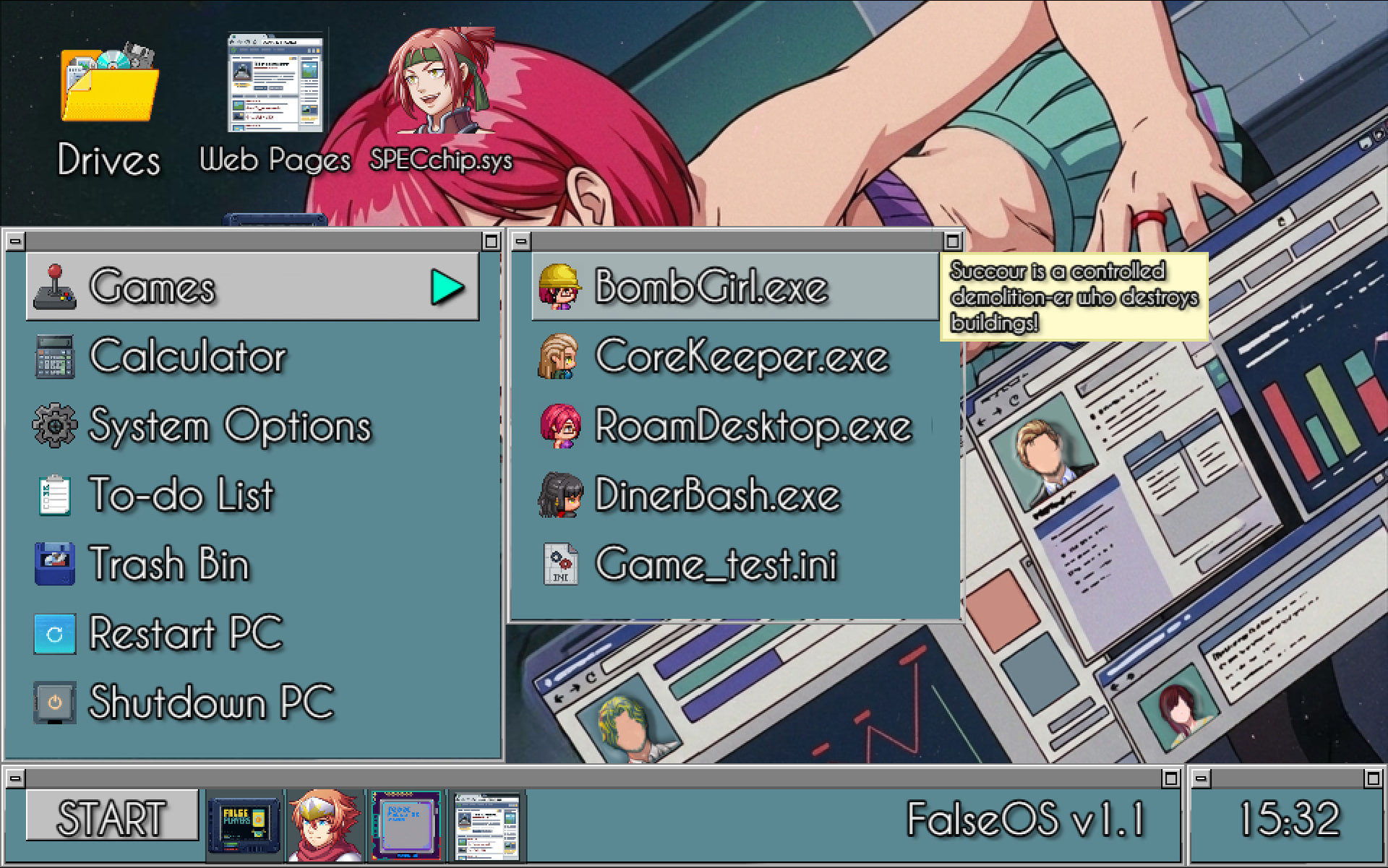
デスクトップオペレーティングシステムを作成しました:
…独自のアプリケーションやミニゲーム付き:
他にもたくさんありますが、例としてはこれで十分でしょう。
これらすべては、それぞれ独立したプラグインとしてJavaScriptでコーディングされており、プラグインコマンドを通じてRPG Maker MVゲーム内で実行されます。
ご意見ありがとうございます。RPG Makerに対するあなたの理解は、私が学ぶべき点がたくさんありますね。ただし、ミニゲームはプラグインコマンドで呼び出される個別の.jsonファイルとして機能するとおっしゃっていたので、ミニゲームはメインのRPGゲームのデータをどの程度まで設定、読み込み、書き込み、アクセスできるのでしょうか?
申し訳ありませんが、繰り返すようですが、私が聞きたいのは、これらのミニゲームがベースゲームの一部である既存のファイルやデータにアクセスできるかどうかです。具体的には、変数、スイッチ、セーブファイルなどが該当します。
(例:ミニゲームで宝くじの当選券をスクラッチし、その情報をRPG Makerゲーム内のスイッチをオンにして保存し、その後店舗でプレイヤーが宝くじに当選したことを確認する)
また、ミニゲームで既存のRPG Makerの機能(例えば、同じスタイルのテキストボックスなど)を使用できるようにすることも可能でしょうか?正直なところ、これはRPG Makerがテキストボックスをそのように作成するために使用するコードを見つけ、それをミニゲームに貼り付けるだけの簡単なケースだと思います。
最後に、このアプローチはゲームがPC以外のプラットフォームをサポートする能力にどのような影響を与えるでしょうか?(タッチスクリーン対応をミニゲームに組み込む必要があるかもしれません)
必ずしもそうである必要はありません。代わりに、プラグインコマンドを使ってPongミニゲームをカスタマイズする例を以下に示します:
…私の持っているプラグインコマンドの一つは、ミニゲーム終了時にスコアを取得し、メインのRPG Maker MVゲーム内の特定の変数に格納するものです。(または、ゲーム終了時にプレイヤーが勝ったか負けたかを確認するための条件分岐)。
ミニゲームは、メインのRPGゲームのデータをどの程度まで構成、読み取り、書き込み、アクセスできますか?
あなたが望むだけできます。デフォルトではできませんが、RPG Maker MVフレームワーク内で(またはその傍らに)構築されているため、あなたが望むことは何でもやり取りできます。変数、スイッチ、データベースエントリ、ゴールドなどです。
デフォルトのアイテムメニュー、装備メニュー、スキルメニュー、さらに戦闘システムでさえ、すべて「シーン」を介して作成されています。そして、それらのデータはデータフォルダ内の個別のjsonファイル(Items.json、Skills.json、Actors.jsonなど)に保存されていることがわかります。(ゲーム内でこれらのメニューが見えるように、他のシーンやメインゲームでデータに影響を与え、変更したり、効果を引き起こしたりすることができます。) あなたが新しく作成するものについても同じことができます。(橋渡しは意図的に行う必要があります。)
(ただし、デフォルトのアイテム&スキルメニューで行っているような詳細な調査までは行っていません。データの受け渡しと勝敗の確認をシンプルに保っています。)
ミニゲームで、RPG Makerの既存の機能(同じスタイルのテキストボックスなど)を利用できるようにすることもできますか? しかし、正直なところ、RPG Makerがテキストボックスをそのように作成するために使用するコードを見つけ、それをミニゲームに貼り付けるだけの簡単なケースだと考えています。
その通りです。
最後に、これは私のゲームがPC以外のプラットフォームをサポートする能力にどのような影響を与えますか?(タッチスクリーンサポートをミニゲームに組み込む必要があるでしょう)
ミニゲーム(およびゲーム全体)では、RPG Maker MVがデフォルトで許可するコントロールに従うべきです。これは、どの「ボタン」が押されているかを確認する条件分岐で確認できます:
…これらのキーはデフォルトでゲームパッド/コントローラーにマップされており、誰かがSteamDeckでゲームをプレイする場合や、Switchにポートする場合、またはPC以外のプラットフォームでエミュレーターを通じてプレイする場合に備えています。(他のキーボードキーを使用することは、主にゲームパッド/コントローラーを使用するPC以外のプラットフォームでゲームがプレイ不能になる可能性があります。)
そして、RPG Maker MVはデフォルトでマウス/タッチサポートを持っています。そのため、一貫したアクセシビリティを持たせるために、ミニゲームにもそれらを追加する必要があります。
「JavaScript アプリケーション」とおっしゃられたので、ミニゲームとして実行したい既存のアプリを想定されているのかもしれませんね。SigmaSuccour さんのアドバイスは、ミニゲームをゼロからコーディングする計画の場合に有効ですが、すでに誰かが構築したものをそのまま利用したい(もちろん無料で使用できるもの)場合は、プロジェクト内のフォルダにバンドルして iframe で起動するだけです。この場合、アプリはデフォルトではゲームにアクセスできませんが、必要に応じて「メッセージ」を介してゲームと通信することができます。
ミニゲームをゼロからコーディングする場合でも、アイデアによってはシーンよりも iframe を使用した方が実際には簡単な場合があります。シーンでは PIXI を使用して要素を配置しますが、iframe では CSS でレイアウトを行います。
ああ、もちろん。私はJavaScriptが本当に苦手で、それを認めることも怖くありません。オープンソースのオプションを調査し、さらに練習するためにそれらを修正していくつもりです。擬似コードの作成や理論的な考察はできますが、実際にその言語でコードを書くことはできません。RPGMaker MVでの経験は約1年で、その時間を境目突破の練習や、自分自身のための有用なリファレンス作成に充ててきました。作成したもの(*)を実演してフィードバックを集めるためのスレッドを将来的に作ることも検討しています。
ありがとう。質問がもう一つだけあります。
どこでそれを学んだのか、あるいは誰に教わったのかを教えてほしいです。最も良いと思うソースを引用してください。私は使っているテンプレートで実験しながら、同時にこれの基礎を学びたいと思っています。
一般的なJavaScriptの最も良いリファレンスは、MDN – Mozilla Developer Networkです。リファレンスですので、基礎を学ぶには最適な場所ではないかもしれませんが(チュートリアル形式のページもいくつかあるとは思いますが)。
で、チェス界隈って実際どうなってるんですか?ただの興味本位ですが(あと、ここではどうやってフォローするんですか?YouTubeでお世話になってたの覚えてます)
プラグインコマンド経由です
再生方法の動画もありますよ:
あと、ここでのフォローはどうすればいいですか?YouTubeでお世話になってたこと覚えてます
ここにはタイムラインのようなものはありません。そのため、フォローという機能は存在しません。
スレッドのフォローという意味ですか?返信ボタン/アイコンの近くにベルのボタン/アイコン(右側あたり)があり、クリックして「ウォッチ」を選択することで、スレッドへの新しい返信やコメントがあるたびに通知を受け取ることができます。