※※※ Attention ※※※
Regarding this thread, please note that the opinions and requests proposed here are not guaranteed to receive a response or action from the official team. This thread is simply a place for us users to compile our opinions and requests regarding AGMaker.
Rotate the graphic to any desired angle
┗ Direct input
┗ Assign a variable value
┗ Random value
… and so on (these are the ones that came to mind immediately…)
I thought this could be easily implemented if such features were available.
Update
This request is based on the idea that “it would be great if it could be achieved simply using only the basic functions of AGMaker.”
After posting this request, thanks to the kindness of Justus, I was able to achieve it using GDScripts.
Therefore, I am adding this update and sharing it.
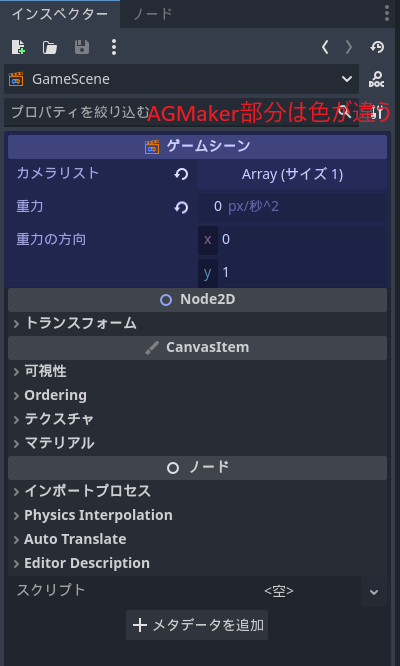
[Request] ・Please make the AGMaker part and the Godot part clearer
(This would make it easier to understand which parts are the AGM section and which parts are the Godot section that don’t need to be worried about.)
※On Discord, we received detailed explanations from knowledgeable individuals regarding opinions, and while I’m not sure if the following content is feasible, I’m submitting it as an opinion here anyway
Regarding untranslated content, there is the issue of requiring a tremendous amount of effort, but
as shown in the image below (this is my imagination…),
I thought it would be good if we could tell whether it’s the AGM part or the Godot part.
※The image below is my hope/imagination and is not the actual editor screen
I would like a debugging feature in the current MV that allows real-time monitoring of each object’s status, such as which action (state) is currently active.
Although it wasn’t available in MV, it would be even more helpful if the object viewed last could be selected by default upon the next launch, allowing immediate inspection.
Additionally, being able to check variables and switch states of that object in real time, similar to MV, would greatly facilitate debugging. Your support on this matter would be greatly appreciated.
I would like to have a state for notes in VS. Currently, I use regular states or group box titles as notes, but since line breaks are not supported, long notes make the states excessively long. It would be even better if I could set the font size manually each time. I would also like to be able to choose the color freely. Thank you.
I would like the ability to check the sound settings when creating actions, have a directory separation for variables and switches, and have a play button to preview sounds currently set in actions. Additionally, I’d like to be able to view variable descriptions when selecting variables or similar items in actions. Since certain features worked well in the previous title, I hope they are retained in this one as well.
The “Play button to preview the sound being set to the action” can be used to preview the sound by setting “In Progress” to “On” within the action being executed. It refers to “Play,” which might be a bit unclear.
Links from State A to State B could be created with two or more using Action MV.
In AGM, it seems you cannot connect nodes that are already linked, preventing the creation of two connections. Is there no other way than creating multiple dummy states for each condition and unchecking the “wait 1 frame” option? I am currently handling it this way, but it is quite troublesome.
~Improvement Request~
When selecting a link, it should be possible to see if it consists of two or three connections, and by selecting it, each individual link should be editable.
It would be better if single and multiple links could be visually distinguished; for multiple links, please use a distinctive line style different from the standard line.
(Will adopting multiple links negate the advantage of this version of AGM, which allows moving or copying/pasting VS groups as a whole?)
Speaking of links, in MV we could shift the arrows to prevent them from overlapping.
However, since the connection points are fixed this time, it seems that won’t be possible.
Regarding numerical input within actions, please allow specifying variables.
For example,
Play Sound - Adjust Sound
allows specifying values such as volume and pitch, but I would like to enable variable specification in such fields as well.
(If possible, it would be ideal to allow variable specification in all numerical input fields.)
I would like to be able to copy “Execute Action” and “Other Condition Settings” using keyboard shortcuts.
Additionally, I would like these to be visually distinguishable even when they are “non-unique.”
・When adjusting the position of “Links,” please enable the ability to hold the SHIFT key while moving, as was possible in Actzuku MV.
Thank you for the major update to Ver 1.1.0!
I immediately started working with the Visual Script, and as mentioned above,
in Actzuku MV, holding the SHIFT key while dragging a Link would fix it in a straight line, allowing for position adjustments. We would like this feature to be available in AGMaker as well.
It would be helpful if lists such as the “Change Property” action could be color-coded
While the current language change is not an issue (understood that it is technically impossible), for example, since the “Emitting” text itself in the Inspector can be clicked, a right-click menu could allow:
Add color (highlight)
Add a mark (☆ at the beginning)
Add color (custom color)
This would make it easier to find the “Change Property” action string, as shown below:
Before even discussing software specifics, there is very little information available online.
I would like detailed tutorials on 2D bone setup, its animation, and animation-related topics in general. While a Guild topic on this would be acceptable, I would also prefer video tutorials on YouTube. There are virtually no Japanese resources available for video tutorials, yet I believe there is definitely a demand for them.
I also want to equip characters with weapons and items. In the case of guns, this would include mouse-following with direction changes. Additionally, I want to create animated objects that move independently of characters.
Other general requests include:
Instead of focusing solely on side-scrolling action games, I would like tutorials on creating top-down and quarter-view (isometric) games. Regarding quarter-view (isometric) games, there are no sample projects available at all, so I would also like sample projects. I believe there is demand even if these are offered as paid add-ons.
I think there would be absolutely a demand for features like Action Game Maker (Pixel Game Maker) MV mode and an MV Project Converter to make creation easier.
These features are at a level where they could be sold separately as Steam DLCs.
■ I would like to see simple templates for save/load screens, title screens, pause menus, etc., added to “Create New Object.”
These features are essential for many 2D action games.
In particular, the save/load functionality in VS involves internal operations, making it difficult to understand how to use it effectively.
Although there is an unofficial sample project created by Aianto Bear, I believe that official templates for such basic features should be included within the tool itself.
Beginners often feel overwhelmed at the start, as if they’ve been thrown into the middle of the ocean with nothing to guide them.
It would be great if, by combining these templates, one could create a complete game similar to what RPG Maker offers.
I think it would be great if multiple visual scripts could be applied to a single object. Currently, there are cases where we are forced to stack separate objects for hitbox detection and other judgment purposes, so being able to handle everything within a single object would be incredibly convenient.
That said, it might be too ambitious for now… I’ve heard Playmaker can do this, so I’m hopeful.