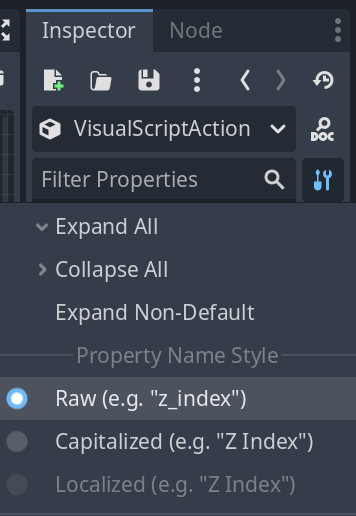
我对 AGM API 的首次“黑客”尝试。
视觉脚本调试看起来已经会很混乱,而且添加 PrintMessageToConsole 动作需要花费大量繁琐的时间 https://guild.rpgmakerofficial.com/t/topic/197
更好的方案是在 VisualScriptAction 上直接提供一个选项来启用该调试功能。

我并不是要求将其添加到 1.0.6 或 1.0.7 版本中。这个想法仍需完善。我正在研究可以为视觉脚本实现的其他调试功能。
这原本只是一张展示选项应出现位置的图片,但工具开发者接手并制作了一个演示脚本。
GitHub Gist: Action Game Marker, Visual Script debugging, GDScript tools。
原始脚本
# debug_vsa.gd
extends VisualScriptAction

@export var print_message_to_console : bool = true :
	set(v):
		if v:
			_add_print_action.call_deferred()
		else:
			_remove_print_action.call_deferred()
		print_message_to_console = v

var _print_action : Actions = PrintMessageToConsole.new()
var _print_action_at_index : int

func _init() -> void:
	_print_action.print_message = visual_script_node_title + " entered"

func _add_print_action() -> void:
	other_actions.append(_print_action)
	_print_action_at_index = other_actions.size() - 1

func _remove_print_action() -> void:
	if  other_actions.size() > 0 and other_actions[_print_action_at_index] == _print_action:
		other_actions.remove_at(_print_action_at_index)
(目前无法将 .gd 脚本作为文件类型上传)
此脚本运行时的 _remove_print_action() 尚未经过测试。
对于熟悉 Godot 脚本的高级用户,要将此脚本附加到 VisualScript (VS) 中现有的 State:
- 在 FileSystem 中创建
debug_vsa.gd - 它应继承自
VisualScriptAction,否则… - 复制上面的整个脚本
- 创建或使用现有的 VS
- 选择
Initial State - 在 Inspector 中滚动到底部的’RefCounted’标题处
- 通过加载、快速加载或拖拽方式分配
debug_vsa.gd

现在您应该有一个已勾选的布尔值选项“Print Message to Console”。在测试运行时,您应该会收到一条包含 State 名称和"entered"的输出消息。
对于调试来说,真正有帮助的是像 Godot 的 SignalVisualizer 插件那样的工具,以便直观地追踪哪些 Links 和 States 正在触发。
除了调试之外,请记住,扩展 VisualScriptAction 或 VisualScriptActionLink 并不能提供进入实际视觉脚本解释器的入口点。它们只是 AGM 用于执行预编码条件检查和运行预编写代码的 Resource。
它们可以允许自定义 GDScript 轻松修改选定的 Links 和 States 及其 Conditions 和 Actions。我不清楚当前的进程安全性,因此请考虑在 _physics_process 中使用 call_deferred 和 set_deferred,以便在修改之前让 AGM 能够引用和修改所有 VS 资源。
 按钮(右侧)查看。