Xでポストされていたヒットストップの機能ですが
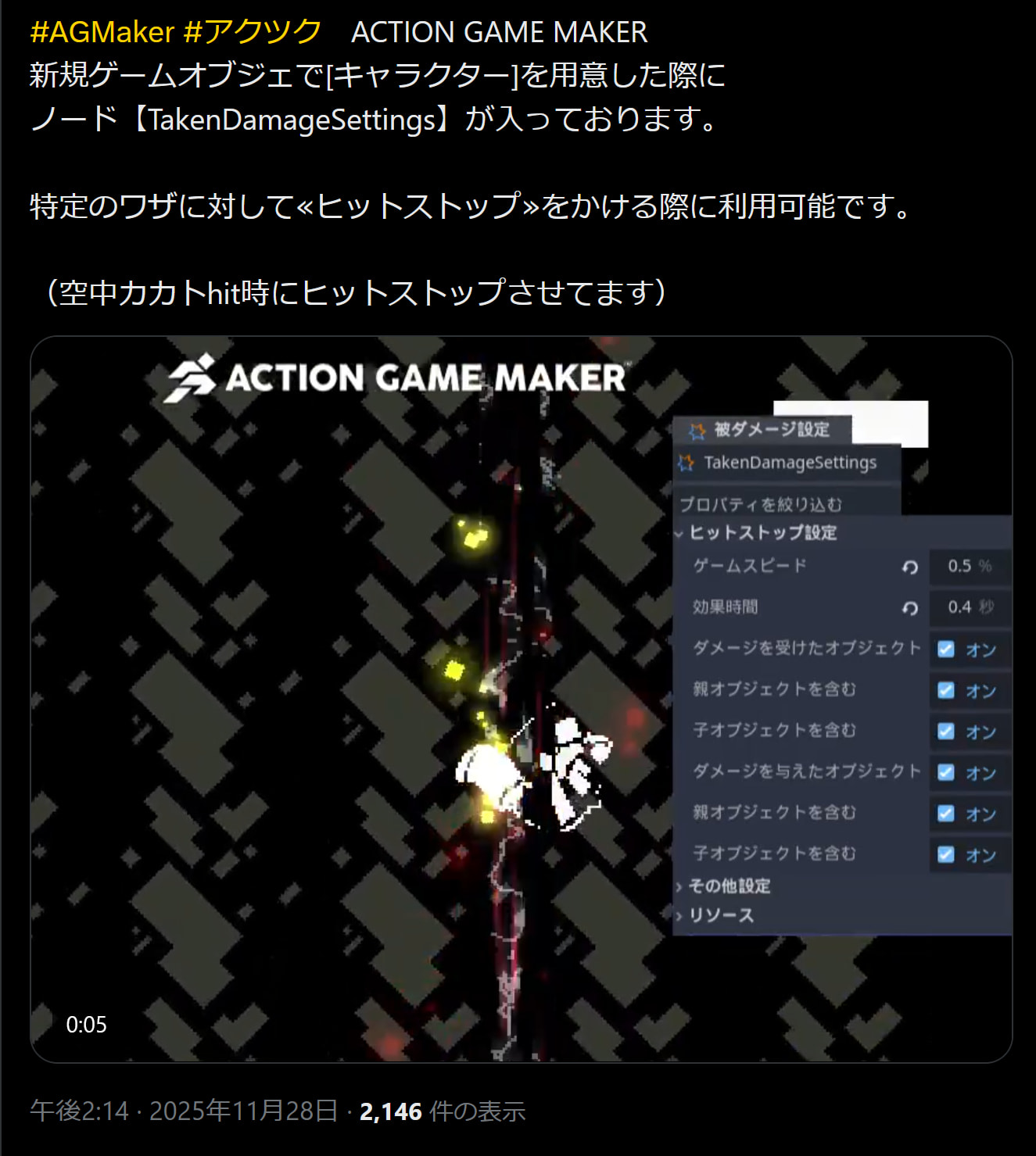
画像と同じ様にTakenDamageSettingsでヒットストップのゲームスピード、時間とストップする対象を設定したのですがプレイヤーにもエネミーにもヒットストップがかかりません
こちらについて使用方法などがありましたらお教えいただきたいです。
またヒットストップのかかる時間は攻撃の技毎に変更可能のようですがどの様に設定すると良いでしょうか。
よろしくお願いいたします。
Xでポストされていたヒットストップの機能ですが
画像と同じ様にTakenDamageSettingsでヒットストップのゲームスピード、時間とストップする対象を設定したのですがプレイヤーにもエネミーにもヒットストップがかかりません
こちらについて使用方法などがありましたらお教えいただきたいです。
またヒットストップのかかる時間は攻撃の技毎に変更可能のようですがどの様に設定すると良いでしょうか。
よろしくお願いいたします。
動画まで用意してくださりありがとうございます
しかしスピードが50%であるがゆえにヒットストップがかかっている様に見えないのが残念です、
TakenDamageSettingsノードを付けてヒットストップのスピードや時間を設定する以外にやるべきことがあるのでしょうか?
ヒットストップを50%より強く設定できます。0%に設定したときも機能しました。
それだけでした。HitAreaとAttackAreaの衝突レイヤーとマスクを適切に設定するのを除いては、それ以外の設定は必要ありませんでした。
ビデオを紹介していただきありがとうございます。確認ですが、たとえばプレイヤーの攻撃衝突(AttackArea2D)をレイヤー3に設定し、敵のダメージ衝突(HitArea2D)をマスク3に設定しても問題ないでしょうか?プレイヤーの攻撃が敵に当たるとダメージ反応に移行するため、特に問題はなかったように見えました。その状態で「TakenDamageSettings」を設定してみましたが、ヒットストップが機能しませんでした。衝突設定や他に確認すべき点があれば教えてください。
はい、動作しているならそれが検出している方法です。攻撃がヒットを検出しているのか、ヒットが攻撃を検出しているのか、時々混乱してしまいます 
あなたのプロジェクトを pgmmv-support@gotchagotcha.jp に送っていただけますか?そうすれば、なぜあなたのプロジェクトでは動作しないのかを確認できます。
ありがとうございます。
プロジェクトファイルを pgmmv-support@gotchagotcha.jp に送信しました。ご確認ください。
ヒットストップ以外の機能の誤った使用方法を見つけた場合、ぜひ教えてください。攻撃判定が当たるときと当たらないときの条件を設定する方法をいろいろ試してみましたが、うまくいきません。
Hito_Tさん
こんにちは、いただいたデータを開発チームで確認させていただきました。
いただいたプロジェクトでは、大きく2点問題がありました。
攻撃のアニメーション(08_G_attack1)を行った際、AttackArea2Dのmonitoring をオフにしている。
monitoring がオフになると、当該ノードの動作をモニター(監視)しなくなるため動作しなくなってしまいます。
コリジョンのレイヤーとマスクの設定が正しくありません。
今回の件だけ修正するのであれば、敵側のHitArea2Dの「レイヤーを2:マスクを3」、プレイヤー側のAttackArea2Dの「レイヤーを3:マスクを2」に変更することで動作するようになります。
コリジョンレイヤー/マスクの概念については以下の記事をご確認ください。
ありがとうございます
教えて頂いた1と2の対応でヒットストップが機能しました。
現状のヒットストップ機能はプレイヤー側で必要だったのですがエネミー側では攻撃を受けた左右に振動するアニメの演出を再生する都合上TakenDamageSettingsのヒットストップをかけないで作り進めております。
エネミーが1度だけダメージを受けてプレイヤーが何もしない場合のステートの進行が
「ダメージ1ステート」→一定時間経過0.4秒→「ノックバックステート」一定時間経過0.2秒→「吹っ飛びステート」一定時間経過0.2秒→「地面叩きつけステート」一定時間経過0.2秒→「バウンド」一定時間経過0.2秒→「ダウン」一定時間経過0.2秒→「起き上がり」→「待機」
となっています。
連続でダメージを受けるケースでは
「ダメージ1ステート」中に攻撃判定がヒットすると「ダメージ2ステート」へ遷移する流れがありまして
また
「ダメージ2ステート」
「ノックバックステート」
「吹っ飛びステート」
「バウンド」
これらのステートの最中に攻撃判定がヒット→「ダメージ1ステート」になります。
「ダメージ1ステート」「ダメージ2ステート」
の内容はそれぞれ
横移動、上下移動、ジャンプ速度をゼロや
実行アクションの「オブジェクトの移動」で移動に関する設定をゼロにして
空中で振動アニメをさせて移動に関してはピタッと静止する様にしているつもりですが
どうやってもダメージアニメをしながら
ノックバック→吹っ飛びの移動を引き継いでいるのか空中で一定時間ストップしてくれません
例えばTakenDamageSettingsのヒットストップ項目に「アニメーションは再生」みたいなチェックボックスがあれば理想ですが
ステートを用いて「空中で攻撃を受けた時に一定時間ストップ」させる方法はあるでしょうか?
よろしくお願い致します。
シンプルに空中で止めたい形であれば対象のステートの上下移動速度、左右移動速度を0%にしてはどうでしょうか?
ダメージを受けたステートの数値や実行アクションに設定してもこのような感じなのですが吹っ飛びの移動が止まらない状況です。こことは違う設定があったりするのでしょうか?
実行アクションも「自分自身」など変更してみましたがやはり止まらない状態です
よろしくお願いします。
なるほど、すでに移動が開始している状態なんですね、
であれば実行アクション「テンプレート移動」の「停止」を追加すれば移動を停止できたかとおもいます
なるほど、いただいたスクリーンショットを見直しましたが重力を無視できていないようです。
「重力の影響を無視する」をオン
「重力の影響を受けない(%)」を100%
にしていただければ恐らくご希望の動作になると思います。
ありがとうございます!
まさに希望通りの動作になりました。


