概要
「InvokeScript」を使用すると、Godot のスクリプト言語であるGDScriptをアクションとして利用でき、「ScriptConditionEvaluator」を使用すると、GDScript を条件として利用できます。GDScript を使用することで、プリセットのアクションや条件では実現できない動作をビジュアルスクリプトで処理することが可能になります。
技術的な概要
これらのアクションと条件を使用すると、ゲームオブジェクトの子ノードにアタッチされた GDScript で定義されたメソッドを実行可能なアクションや条件チェックとして利用することが可能になります。
手順
-
アクションまたは条件を使用したいゲームオブジェクトの子として、Node2Dを作成します。

-
作成した Node2D にGDScriptをアタッチします。
スクリプト名は任意です。
-
以下のサンプルコードをコピーして貼り付けます。
このコードには、「Player」グループ内のオブジェクトが X 軸上で100 ピクセル以内に入った場合にTRUE(遷移をトリガー)を返す**is_player_in_x_range**というメソッドが含まれています。
Y 座標はチェックしないため、プレイヤーが異なる高さであっても機能します。
このメソッドは、プレイヤーが近づいたときに罠や敵が上から落ちてくるような用途に役立ちます。

extends Node2D

@export var attack_range := 100.0
var player: Node2D

func _ready():
    # 「Player」グループに登録されている最初のノードを自動的に取得
    player = get_tree().get_first_node_in_group("Player")

func is_player_in_x_range() -> bool:
    if not player:
        return false

    var diff_x = abs(global_position.x - player.global_position.x)
    return diff_x <= attack_range
-
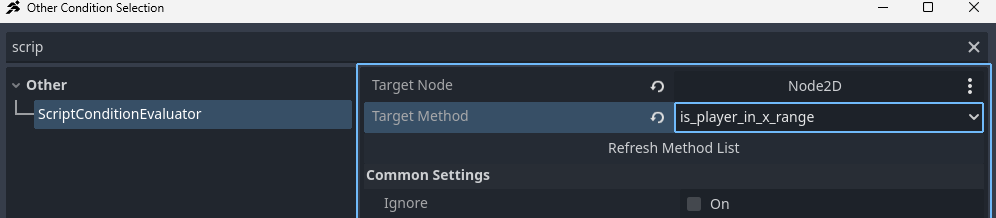
任意のリンクの「その他の条件」に**「ScriptConditionEvaluator」を追加し、
ターゲットノードを先に作成したNode2D**に設定し、
メソッド名is_player_in_x_rangeを指定します。
-
プレイヤーがオブジェクトに近づいたときに遷移が機能するかテストします。
単一の GDScript 内で複数のメソッドを定義し、必要に応じて使い分けることも可能です。
この例では明確にするために「ScriptConditionEvaluator」を使用しましたが、
「InvokeScript」でも設定手順は同じです。
わずかに異なるのはオプションのみです。
「スクリプトを実行」オプション:実行タイミング
実行タイミングオプションは、スクリプトメソッドがいつ実行されるかを決定します。
- OnStateEnter: 指定された状態に進入した直後にメソッドを実行します。
- OnStateUpdate: 状態に留まっている間、毎フレームメソッドを実行します。
(注意:パフォーマンスへの負荷が比較的高くなる場合があります。) - OnStateExit: 指定された状態から退出したときにメソッドを実行します。